TryHackMe — MAL: Strings Room Walkthrough
Investigating strings within an application

Image Credit: https://tryhackme.com/r/room/malstrings
Introduction:
Hello! Welcome and thanks for joining me for this weekly walkthrough!
This week, I am doing something a little different. Rather than a challenge, I am going through the MAL: Strings room over on TryHackMe. This room is part of their Cyber Defense learning path. I’ve been putting off finishing this path for a while, but I thought it might be a good time to tackle this room and do a write up, too! This is a brief room but touches on some really valuable resources like researching CVEs, OWASP, crypto wallet address lookups, and Sysinternals Strings, so stick around!
As always, this write-up serves as a learning journey notebook for me and a TryHackMe room reference walkthrough for anyone else who stumbles upon this post. Thanks for reading along, hope it helps!
Challenge Link: https://tryhackme.com/r/room/malstrings
What are “strings”?
While this information is covered very well in the room’s learning content, I want to put an excerpt here for reference that will help frame the tasks as we move forward about what exactly strings are.
Background on strings from Task 1:
From a programming perspective, “strings” is the term given for data handled by an application. At a broader view, these pieces of data are used to store information such as text to numerical values.
For example, let’s say we have an application such as a calculator. A user will have to input two numerical values (e.g. 1 and 5) combined with an operator (e.g. + or plus) addition in this case. These values will be stored as “strings”.
However “strings” can be stored within the application itself — where no input is necessary from the user. For example, using the example of usernames and passwords is a great representation of the many types of information that may be stored as a “string”.
So put another way, if we are analyzing an application or some code, being able to extract strings can help us as analysts to understand a program’s intent or functionality and could reveal interesting artifacts like IP addresses, URLs, commands, credentials, etc. With that in mind, let’s start working through the room!
Task 1
What is the name of the account that had the passcode of “12345678” in the intellian example discussed above?
Jumping right in, we’re looking at examples of software vulnerabilities caused by storing sensitive information like passwords within the application which might lead to unintended access or information disclosure.
The task states that:
Intellian, a satellite-communications focused company had the disclosure of their “Aptus Web 1.24” application retaining a default passcode of “12345678”
So, we need to do some research to discover what the account name associated with the default password is. We’ll start by visiting the CVEdetails website so that we can search the vendor and product name from the question. Let’s input the information and see what we can find.
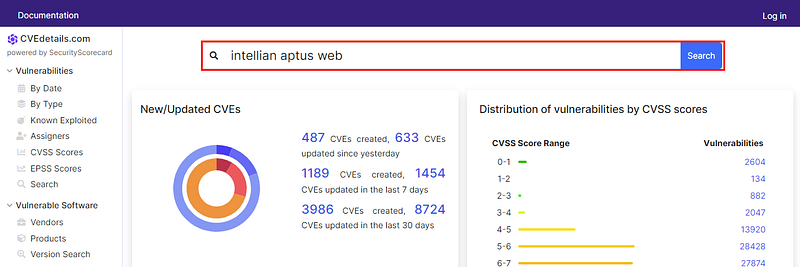
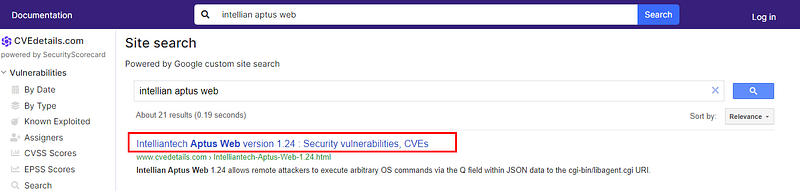
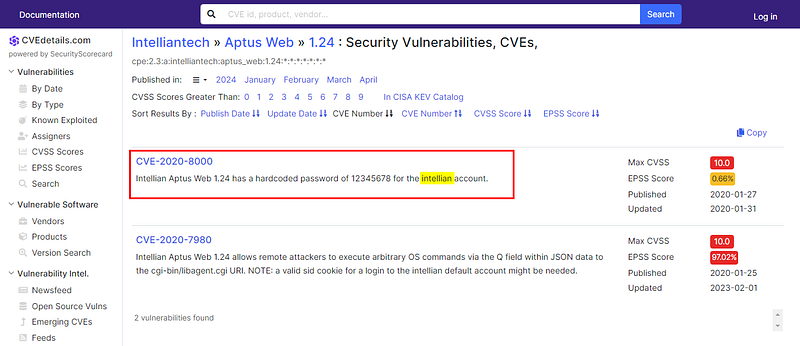
Once we get to the product page for the vulnerable version listed in the task content, we find two vulnerabilities. If we look at the descriptions, we see that the first one, CVE-2020–8000, has a hard coded password that matches what we are looking for. From there, we have the username as well!
Intellian Aptus Web 1.24 has a hardcoded password of 12345678 for the intellian account.

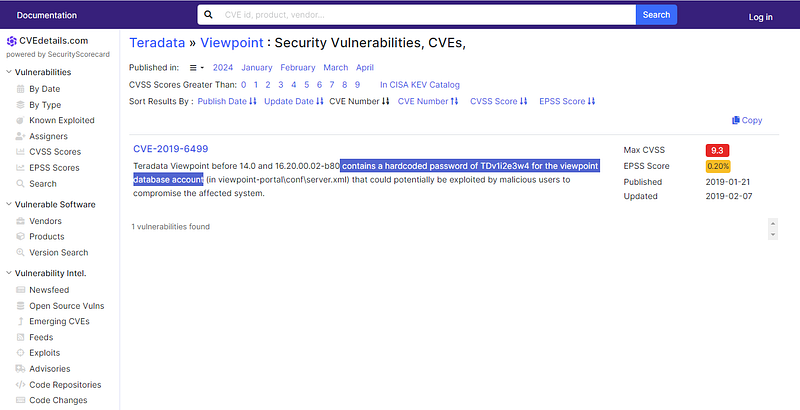
What is the CVE entry disclosed by the company “Teradata” in their “Viewpoint” Application that has a password within a string?
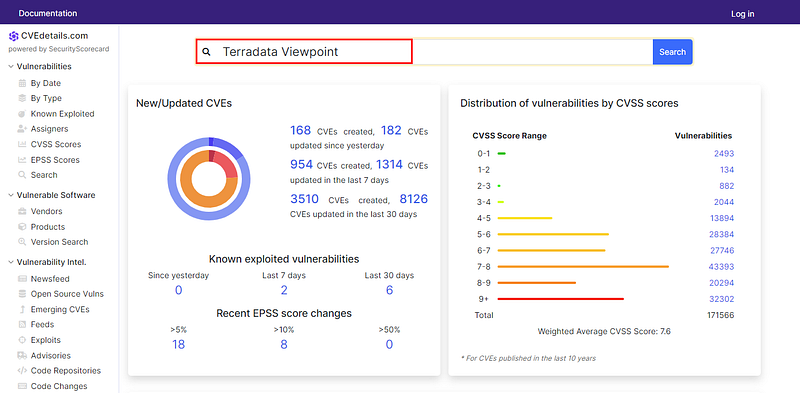
We’ll follow the same process that we did for the last question. Let’s search the CVEdetails and see if we can discover the CVE entry assigned to the vulnerability in the Teradata Viewpoint application.

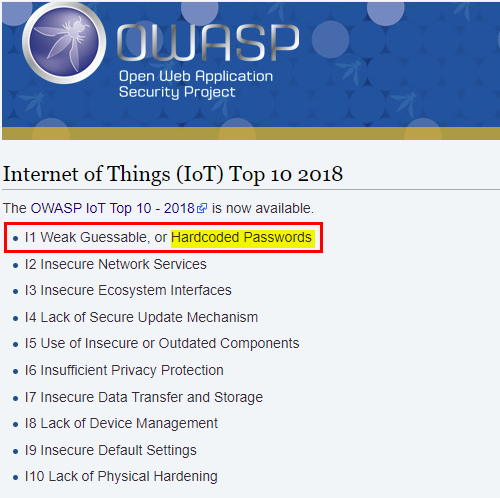
According to OWASP’s list of “Top Ten IoT” vulnerabilities, name the ranking this vulnerability would fall within, represented as text.
For those who are unfamiliar, the Open Worldwide Application Security Project (OWASP) is a foundation that publishes guidance to help developers create secure software projects. The OWASP Top 10 documents are like “what not to do” lists so developers can avoid the most commonly exploited security mistakes for a particular category of software or application. For our purposes, we want to review the OWASP Internet of Things (IoT) Top 10.
OWASP IOT Top 10:
OWASP Internet of Things Project _Oxford defines the Internet of Things as: “A proposed development of the Internet in which everyday objects have…_wiki.owasp.org
Let’s take a look at the IoT guidance. The previous two questions have been about vulnerabilities due to Hardcoded Passwords. According to OWASP, this the number one vulnerability facing IoT projects.

Task 2
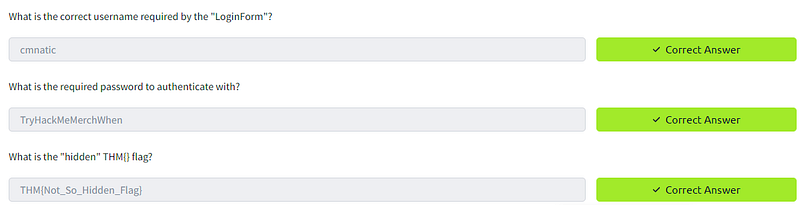
What is the correct username required by the “LoginForm”?
What is the required password to authenticate with?
What is the “hidden” THM{} flag?
Now we get a little bit of hands-on time! The task files contain an executable called LoginForm.exe — for strings analysis we can use the built-in strings command in Linux. For the purposes of this task, I am using my own REMnux virtual machine but you can use any distro of your choice including the Kali Linux box on TryHackMe.
So, now that we have the file in our analysis environment, let’s just run the strings command and let it print to the console and see what we find!
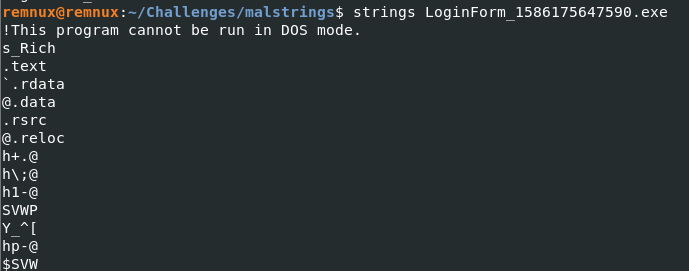
Strings output.
Okay, there is a lot of data here. Maybe it will be easier to search if we output to a txt file instead? For this example, I am going to write to an output file called stringsdump.txt but you can use whatever you’d like.
strings LoginForm_1586175647590.exe > stringsdump.txt
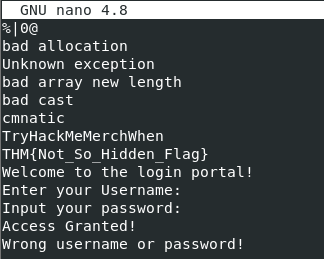
Strings output to txt file
There we go! If we scroll through the list, we’ll stumble on a few strings that look like a username, password, and a flag. Great find!
Task 3
What is the key term to describe a server that Botnets recieve instructions from?
Moving right along, there isn’t much that we need to do here. If we read through Task 3, we are able to answer this question from the learning content:
malware types such as botnets and ransomware rely upon information being stored within strings I.e. IP Addresses so that they are able to “call home” and connect to their “Command and Control” (C&C) server.
Below, I’ve added some additional context about the Command and Control tactic from MITRE ATT&ACK (TA0011).
Command and Control _The adversary is trying to communicate with compromised systems to control them. Command and Control consists of…_attack.mitre.org

Name the discussed example malware that uses “strings” to store the bitcoin wallet addresses for payment
Same thing as the previous question — Let’s read through the task content to find the answer:
A famous example is the “Wannacry” ransomware. The “killswitch” was a domain that was discovered as a value contained within a string.

Task 4
List the number of total transactions that the Bitcoin wallet used by the “Wannacry” author(s)
For this task, we’ll go and gather some intelligence on the Bitcoin wallet used by this threat actor to see how many transactions have occurred. There are a few sites we can do this on but let’s first check out the suggested website, BlockCypher.
Once we look up the Bitcoin address on the site, we’ll see the number of received Bitcoins and the total number of transactions for the address.
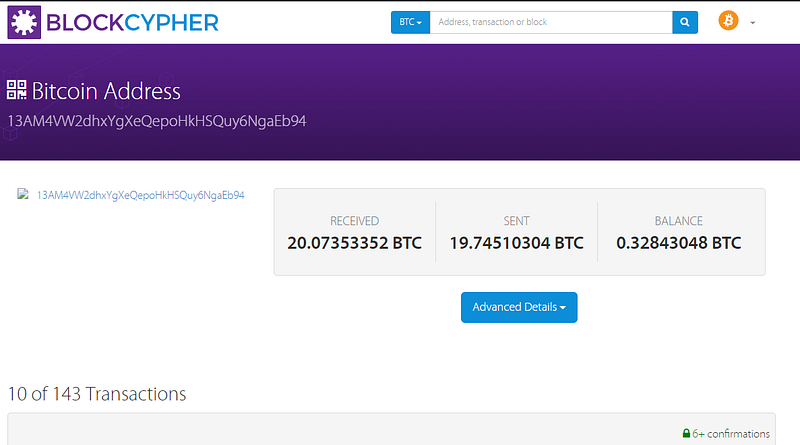
Bitcoin address lookup on BlockCypher
For fun, let’s check another source, ScamAlert. This website tracks Bitcoin wallet fraud and scams and can be used to check a Bitcoin addresses — very handy! Let’s look up the wallet address from the task here, too. We’ll find that the website has flagged it as a ransomware address. But what if we want more detail?
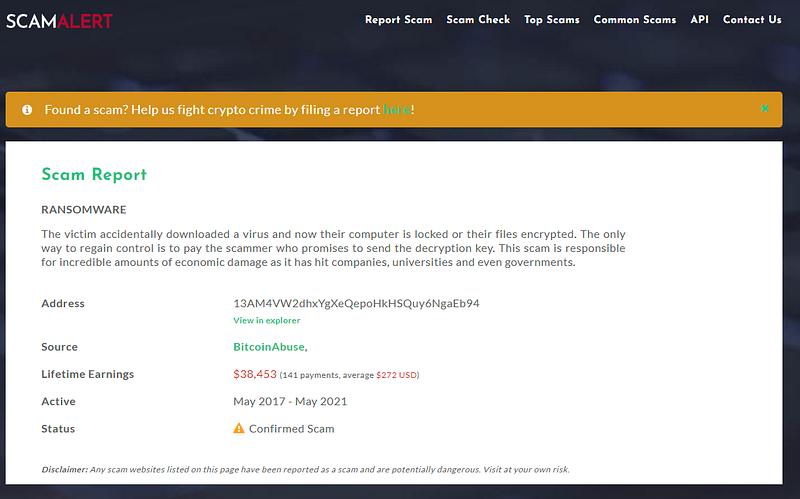
Bitcoin address lookup on ScamAlert
If we click the source URL, we are taken to Chainabuse (which has merged with Bitcoin Abuse). This is another site that can be used to report on malicious crypto activity. Now, if we input the wallet address on this site, we get even more intelligence that confirms the association with Wannacry/Wannacrypt.
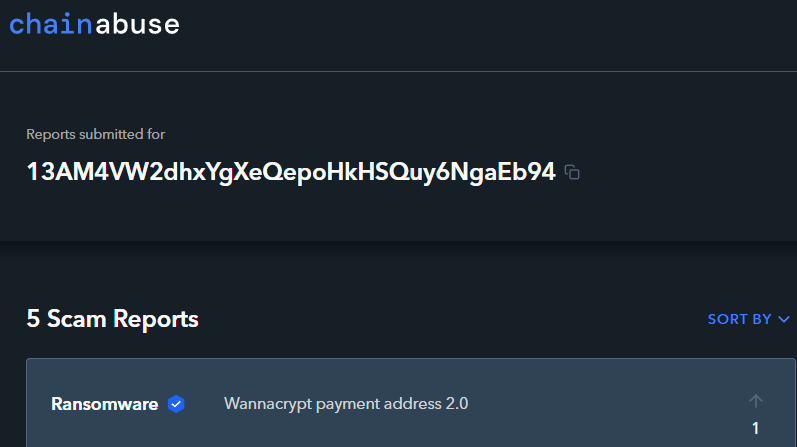
Bitcoin address lookup on Chainabuse
Let’s submit the answer of the total number of transactions that we discovered from BlockCypher and move on.

What is the Bitcoin Address stored within “ComplexCalculator.exe”
Okay, more hands-on time! This time around we will use a Windows environment instead of Linux. This is a great opportunity to try out the Strings tool which is part of the Microsoft Sysinternals suite of utilities_._
Fortunately, this task includes a virtual machine which has the Sysinternals utilities installed already. We will use strings.exe to extract the strings from within the included executable file, ComplexCalculatorv2.exe
Let’s launch the virtual machine and see what we can discover!
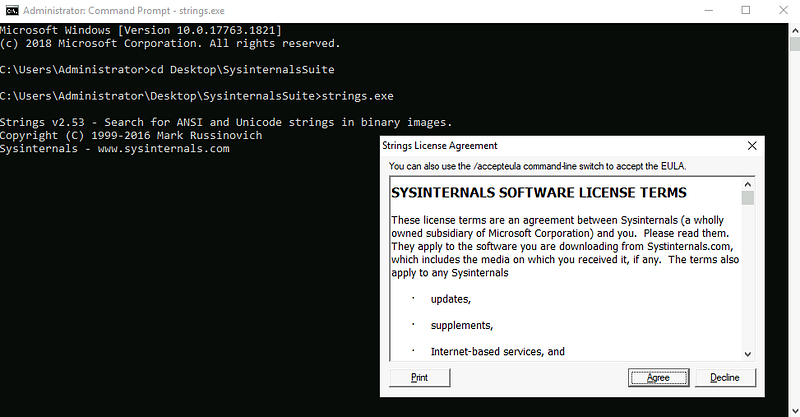
First, we’ll open the Command Prompt (cmd.exe) as Administrator. Then, we will change the directory to the folder on the Desktop containing the Sysinternals tools_._ Since Strings is a command-line utility, we will launch it from the command prompt and accept the license agreement.
Now, let’s go ahead and run Strings using the following syntax. We’ll use the > operator to direct the output to a file instead of the console:
strings.exe ComplexCalculatorv2.exe > strings.txt
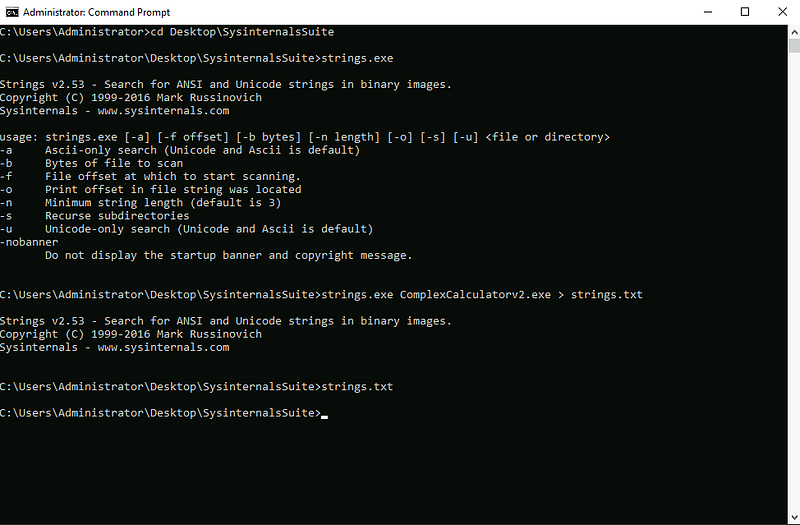
Now that we have sent the output to a text file, let’s open it up in Notepad. Since we are searching for a Bitcoin address, let’s speed this up and use Notepad’s find function by pressing CTRL + F and typing in “bitcoin” — This should help us locate the string quickly!
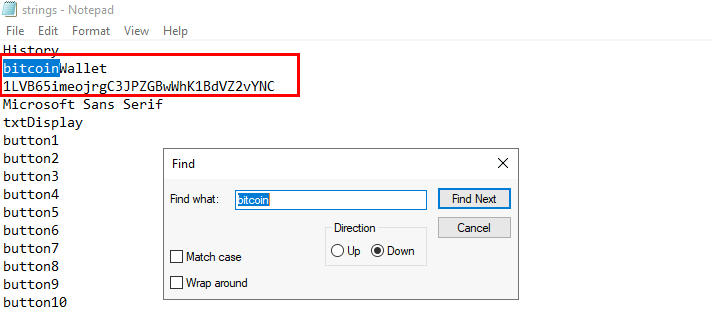
Nice! It looks like we found our answer!

Task 5
What is the name of the toolset provided by Microsoft that allows you to extract the “strings” of an application?
Alright, we’re in the home stretch! Task 5 is going to focus on the theories that we just utilized in Task 4.
In the last task, we used Strings in the Windows environment. This utility is part of the Microsoft SysInternals toolset.
Strings - Sysinternals _Search for ANSI and UNICODE strings in binary images._learn.microsoft.com
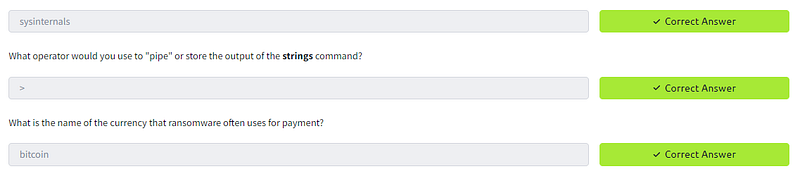
What operator would you use to “pipe” or store the output of the strings command?
I believe the question is asking about redirecting output, not piping, since we aren’t sending the output of the command into the input of another command. With that, remember in Task 4 that we directed the output of Strings with the > operator to a .txt file? I think we are looking for > as the answer.
What is the name of the currency that ransomware often uses for payment?
Okay, last one! In Task 4, we were looking up the Bitcoin address for Wannacry and Bitcoin is a type of cryptocurrency, so it seems to me that we already have the answer — let’s check our work!
Conclusion:
Awesome job! We made it through the MAL: Strings room!
Thank you to TryHackMe for the interesting room as I close in on the end of the Cyber Defense learning path. While this room was pretty brief and a little light on the hands-on content, it was still a fun experience to do some research with CVEdetails and OWASP and to explore the Strings utilities available in Linux and Windows.
I also enjoyed checking out some of the c_rypto wallet_ lookup tools and see what kind of intelligence can be found about Bitcoin addresses. This will definitely be useful in the field! It never hurts to have some more experience with a new tool to keep in your kit, after all!
Thank you so much for reading along. I hope that you had as much fun as I did and learned something new, too. Until next week — stay curious!
Tools & References:
CVE Details: https://www.cvedetails.com/
OWASP: https://wiki.owasp.org/index.php/OWASP_Internet_of_Things_Project#tab=IoT_Top_10
REMnux: https://remnux.org/
BlockCypher: https://live.blockcypher.com/
ScamAlert.io: https://scam-alert.io/
ChainAbuse: https://www.chainabuse.com/
Sysinternals Suite: https://learn.microsoft.com/en-us/sysinternals/downloads/sysinternals-suite