LetsDefend — Samba Spy Challenge Walkthrough
Investigating a Malicious JAR File Using Java Decompiler, VirusTotal & MITRE ATT&CK.
Image Credit: https://app.letsdefend.io/challenge/samba-spy
Introduction:
Welcome back to another weekly walkthrough! If you’ve stumbled across this blog while looking for a comprehensive guide the Samba Spy challenge from LetsDefend, you’re in the right place. This challenge is a great opportunity to explore how adversaries use Java-based payloads, obfuscation, and anti-analysis techniques to evade detection.
Challenge Scenario:
Your organization has discovered an infection on one of its systems involving a malicious Java application. This malware performs environment checks to ensure it is not running inside a virtual machine and targets systems with specific configurations. Once the required conditions are met, it extracts files and executes malicious components that could compromise sensitive data or system integrity. The stealthy nature of the malware and its ability to evade detection pose a serious threat, requiring immediate action to secure the network and prevent further compromise.
Uh-oh! That doesn’t sound good. It’s up to us to spring into action in our LetsDefend virtual machine, reverse engineer and investigate its behavior, and prevent any further damage.
This one’s a bit different from the usual endpoint or network forensics challenges. We’ll be stepping into the world of static analysis with a sprinkle of reverse engineering, using tools like JD-GUI, VirusTotal, MITRE ATT&CK, and good old-fashioned logic to uncover what this malware is up to.
If you’re new to Java malware or just want to sharpen your analysis skills, this is a great challenge to stumble into. Let’s dig in and see what this .jar file is hiding.
Sounds like fun, right? Let’s get into it!
And if you find this walkthrough helpful — whether it levels-up your skills, gets you over a stumbling block, or serves as a handy reference — please give it a clap and consider following me for more content like this.
Thanks for reading and going on this investigation with me!
Question 1: What is the name of the method that checks if the program is running inside a virtual machine?
Let’s kick off this investigation by opening the ChallengeFile folder and unzipping challenge.7z using the password provided in the challenge description. This leaves us with the sample we’ll be analyzing: 1.jar.
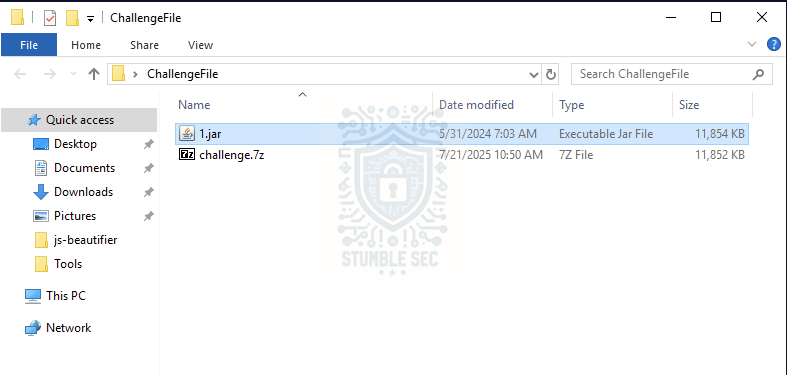
Unzipping the ChallengeFile
Our first step is to select a tool we can use to decompile the sample and peek into the code. Fortunately, the LetsDefend VM is already loaded with a number of analysis tools, including Java Decompiler (JD). Since reverse engineering isn’t in my usual wheelhouse, the graphical version, JD-GUI, will be perfect for us to use. According to the project’s GitHub page:
JD-GUI is a standalone graphical utility that displays Java source codes of " # "
.class" files. You can browse the reconstructed source code with the JD-GUI for instant access to methods and fields.
Sounds perfect! Let’s give it a try by launching the application from C:\Users\LetsDefend\Desktop\Tools\jd-gui-windows-1.6.6 - Java Decompiler.
Once it’s open, we can load the 1.jar sample file and immediately jump in by expanding JavaApplication1.class > JavaApplication1. This will allow us to check out the methods within the application.
With that in mind, to answer Question 1, select the obviously named isRunningInVM() method on the left and view its contents on the right. We’ll see that this method is checking if the JAR file is executed in a virtual machine. One way it does this is by checking if the operating system name matches known virtualization providers.
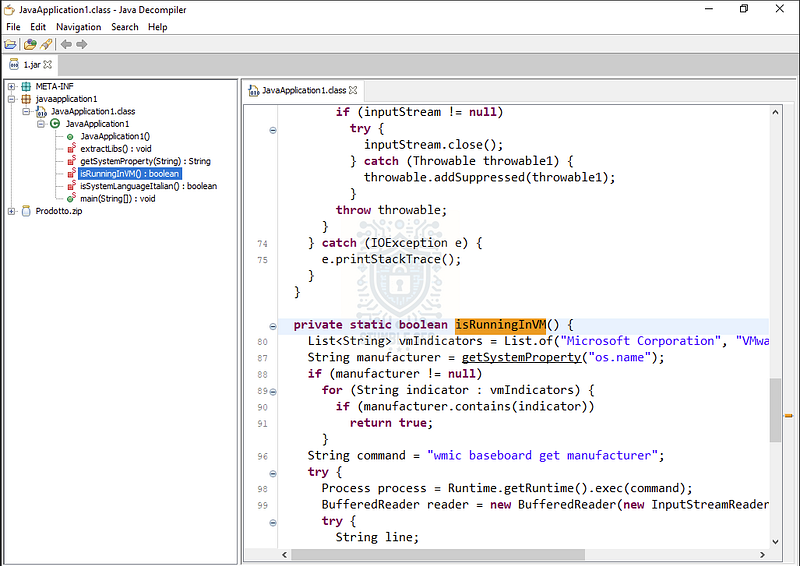
Identifying the isRunningInVM() method
Now, there could be a valid reason for it, but the presence of a method checking for virtualization is suspicious. Malware might attempt to evade detection by checking if it’s executed in a virtual environment, potentially operated by one of us defenders, and changing its behavior accordingly. This is an example of the MITRE ATT&CK technique Virtualization/Sandbox Evasion: System Checks (T1497.001).

Question 2: What system language is required for the program to continue execution?
The next thing we’ll need to uncover is what system language is required for the application to continue execution. We can find this in the isSystemLanguageItalian() method.
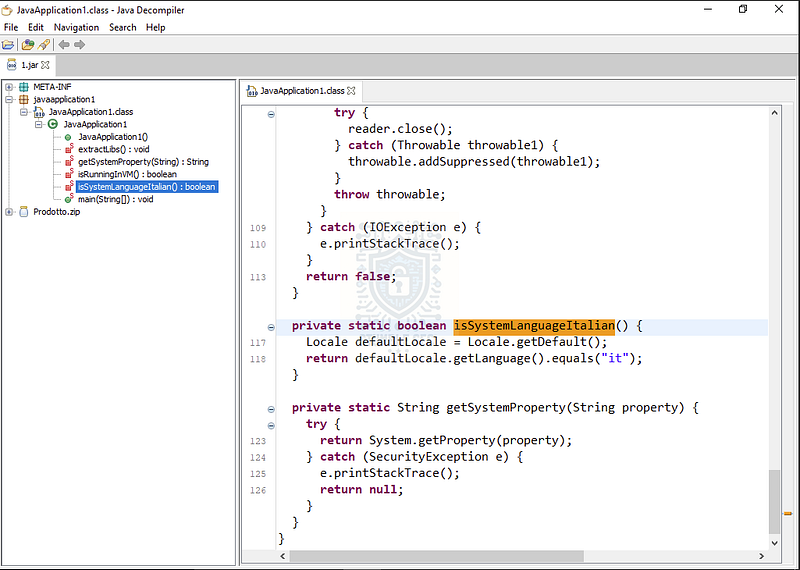
Identifying the required language for execution
This interesting little tidbit that tells us the malware might be targeting Italian systems only, since it only runs when that language is detected. This could be another example of an evasion tactic or might indicate a targeted attack. Let’s keep going and see what else we can discover about the malware’s capabilities.

Questions 3 & 4:
What is the name of the method responsible for extracting the Prodotto.zip file?
What is the default extraction path for the Prodotto.zip contents?
To answer Question 3, we’re searching for a method used to extract the file Prodotto.zip. We can identify this function within the extractLibs() method, which references the file directly on line 50.
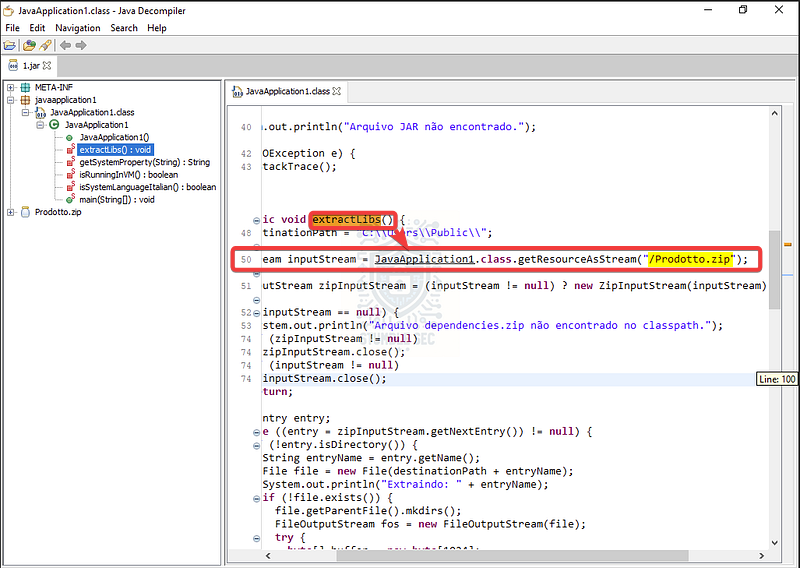
Identifying the .zip extraction method
To answer Question 4, we can identify the defined extraction path for this .zip file by checking line 48, where the DestinationPath variable is defined as C:\Users\Public.
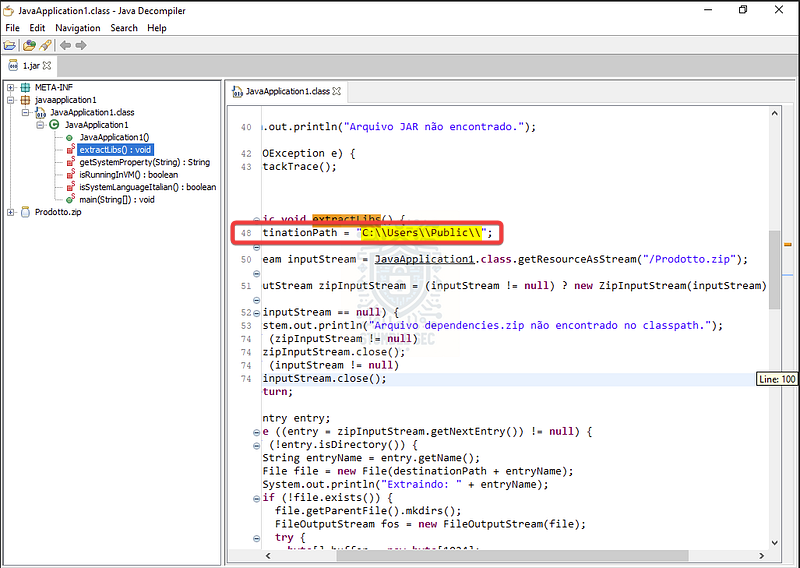
Identifying the default path for .zip file extraction
This is another suspicious behavior that suggests the malware is dropping a second-stage payload. The use of the C:\Users\Public folder is also a red flag. It’s a commonly used directory for malware staging because it acts as a shared location across all user accounts in Windows. In other words, any user on the system can read from and write to this directory, making it a prime location to affect all users on the system.


Questions 5 & 6:
What file name does the program look for after extraction to run as a JAR file?
What command is used to execute the extracted JAR file?
Moving right along, we now need to identify the second-stage JAR file that’s executed by the malware. Let’s check out the main(String[]) method as a first step. Here, we can see another file extracted from the Prodotto.zip archive in the same directory: prodotto.png. This is declared as the jarPath variable.
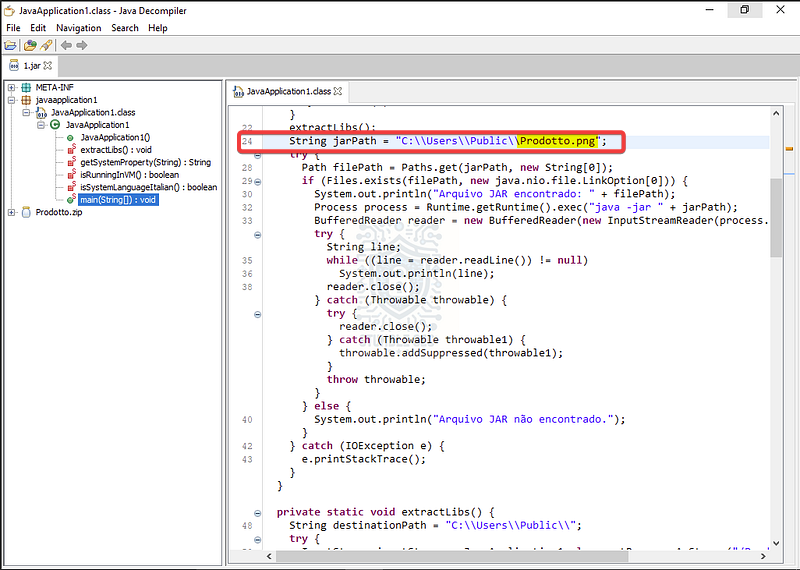
Identifying the extracted file
This looks promising — but we’re looking for a JAR file, right? Well, this is a little tricky. Take a look at line 32: we can see what appears to be a command executing a JAR file using Runtime.getRuntime().exec() with the jarPath variable. Strange!
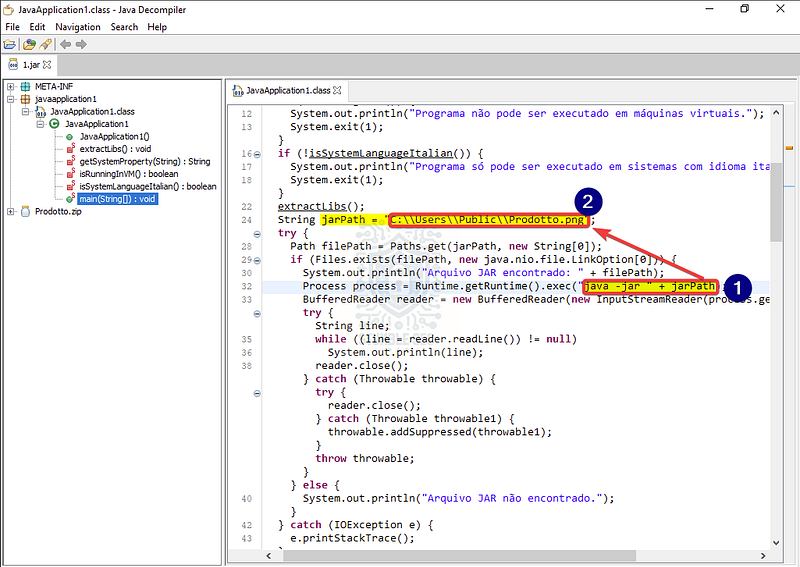
Identifying the execution command
Surprise! This appears to be an example of file type masquerading as described by the MITRE ATT&CK technique Masquerade File Type (T1036.008). So, the file is named with a .png extension, but it’s actually a .jar file and is executed using the java -jar command.
While it’s a little out of scope for this challenge, we can confirm this behavior by grabbing the file hash of 1.jar from the LetsDefend VM and pivoting to VirusTotal. From there, we can check the Relations tab for Prodotto.zip > prodotto.png to confirm that the magic byte indicates it’s indeed a .jar file.
If you’d like to try it out, you can use the Get-FileHash command in the VM to calculate the hash of 1.jar, but I’ve included it below for convenience:
49BBFAC69CA7633414172EC07E996D0DABD3F7811F134EECAFE89ACB8D55B93A
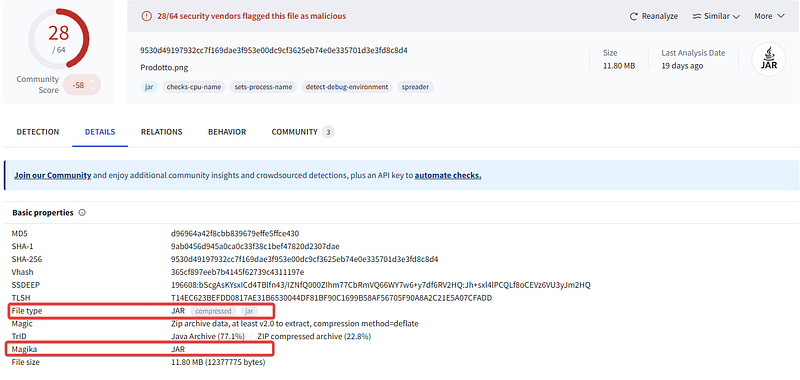
VirusTotal: Details of Prodotto.png
Ultimately, we can confirm the answer to Question 5 is correct: prodotto.png is indeed a .jar file. And for Question 6, the command used to execute it is:
java -jar C:\Users\Public\Prodotto.png


Question 7: What process is used to check if the system is running in a virtual machine (besides the manufacturer string)?
Remember back in Question 1, where we identified the isRunningInVM() method that the malware uses to check if it’s running in a virtual machine? While we identified the method, we didn’t really dig into how that check occurs.
From what we can tell, there are a couple of ways the malware does this. One method is by listing the system manufacturer string using System.getProperty("os.name"), and then comparing it to a list of known virtualization providers (like VMware, Oracle, etc.).
But this would only return the name of the operating system, like Windows 11, macOS, Linux, etc. So, we’re looking for a different method, which we’ll find on line 96:
wmic baseboard get manufacturer
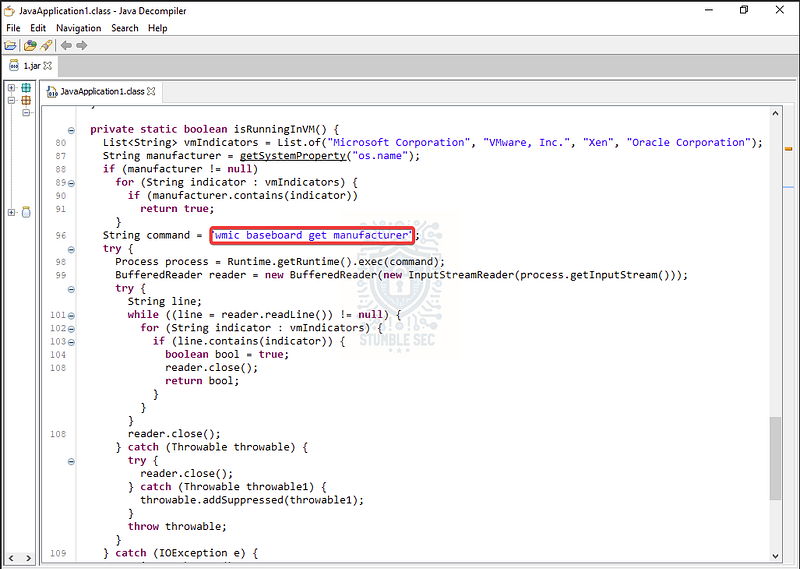
Identifying baseboard manufacturer enumeration
Using this WMI command in Windows will return the motherboard manufacturer, which the malware compares to a list of vmIndicators as mentioned above. The idea is that if the execution environment is a VM, it would be reflected in the baseboard manufacturer string which is pretty clever.

Question 8: How many virtual machine vendors does the program check for?
Now onto the final question! To answer Question 8, we simply need to look at the list of vmIndicators we talked about in the previous question. If we expand the row on line 80, we’ll see the four VM providers the malware checks for — nice job!
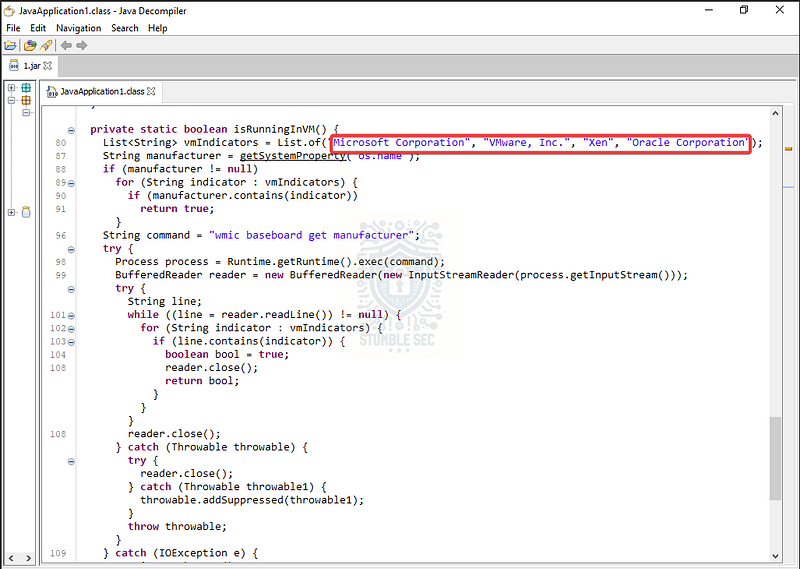
Identifying the VM providers

Conclusion:
How fun was that! A big thank you to LetsDefend for putting together another awesome experience.
This one was a great change of pace from my typical endpoint or network forensics investigation walkthroughs. It gave me a chance to explore how Java-based malware operates, how it uses environmental awareness to evade detection, and how file type masquerading can try to throw us off the trail. Now that we’ve gained a better understanding of how this malware behaves, it’s time to wrap this investigation.
I chose this challenge to keep reverse engineering in the rotation because it’s a weak spot for me. This was a great excuse to try a new tool and go hands-on with Java Decompiler, and it’s now another tool I’ll be keeping in my kit for future malware analysis. The challenge also reinforced how important it is to understand anti-analysis techniques and how adversaries use them to stay hidden. Awesome stuff!
Thanks for your support and partnering on this investigation. If you found this walkthrough helpful, don’t forget to give it a clap! Your feedback really is invaluable, and it pumps me up to support your security journey. Remember, Cybersecurity is a team sport and we’re in this together!
Until next week’s challenge — stay curious and be safe out there!

Tools & References:
Challenge Link: https://app.letsdefend.io/challenge/samba-spy
Java Decompiler: https://java-decompiler.github.io/
MITRE ATT&CK — Virtualization/Sandbox Evasion: System Checks (T1497.001): https://attack.mitre.org/techniques/T1497/001/
MITRE ATT&CK — Masquerading: Masquerade File Type (T1036.008): https://attack.mitre.org/techniques/T1036/008/
VirusTotal: https://www.virustotal.com/
VirusTotal — Prodotto.png: https://www.virustotal.com/gui/file/9530d49197932cc7f169dae3f953e00dc9cf3625eb74e0e335701d3e3fd8c8d4/details