LetsDefend — PHP-CGI (CVE-2024€“4577) Challenge Walkthrough
Investigating a web server exploitation attempt using Apache & PHP logs, Notepad++, and the Windows Prefetch.

Image Credit: https://app.letsdefend.io/
Introduction:
Welcome to my weekly walkthrough! If you’ve stumbled across this blog searching for a comprehensive walkthrough of the PHP-CGI (CVE-2024€“4577) challenge from LetsDefend, you’re in the right place.
In this scenario, we’re jumping into the shoes of a security analyst to investigate an exploitation attempt against a critical web server. Our objective is to analyze the provided artifacts and determine which vulnerability the attacker attempted to exploit. To perform the investigation, we’ll navigate through several logs, including the Apache HTTP server logs, PHP logs, and Windows Prefetch files. The indicators of compromise found in these logs will help us ultimately identify the vulnerability (CVE) used in the attack. Sounds like fun, right? Let’s get into it!
And if you find this walkthrough helpful — whether it levels-up your skills, gets you over a stumbling block, or serves as a handy reference — please give it a clap and consider following me for more content like this.
Thanks for reading and going on this investigation with me!
Challenge Link: https://app.letsdefend.io/challenge/php-cgi-CVE-2024-4577
Challenge Scenario:
You will confront an attempted exploitation of a newly discovered and unpatched vulnerability (CVE-2024-XXXX) in a critical software component within your organization’s infrastructure. The CVE allows for remote code execution, posing a significant threat if successfully exploited. At 12:05 PM UTC, an alert is generated by the Intrusion Detection System (IDS) and Intrusion Prevention System (IPS), indicating an attack on one of your web servers. Your task is to analyze the provided artifacts, confirm the exploitation attempt, and answer the provided questions.
Question 1: What version of PHP was running on the server during the incident?
Despite the title spoiling some of the mystery, let’s approach this challenge without any additional background about the vulnerability so that we can perform the investigation using the available artifacts. To get started, extract the artifacts from artifacts.7z within the ChallengeFile folder.
Inside, we’ll find three folders that give us an idea of what artifacts are available for analysis:
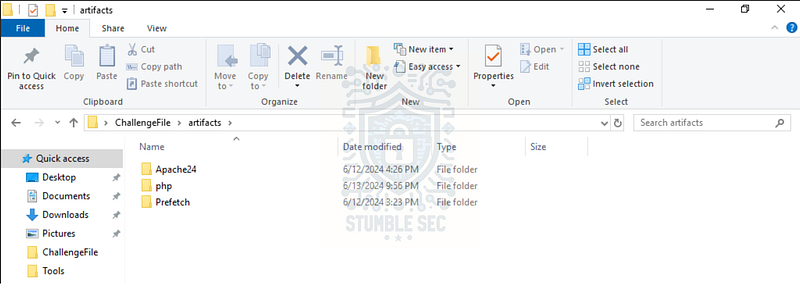
- Apache24: This folder contains the files related to the Apache HTTP Web Server, including configuration files.
- php: This folder holds the PHP runtime and its associated files and resources, including the executables, configuration files, logs, and temp files.
- prefetch: Prefetch files are used in Windows to speed up the loading of applications. These files contain information about the applications that have been run, including their execution history, file paths, and timestamps.
We’ll explore each of these folders during our investigation, but let’s start with the php folder since we’re searching for the running PHP version. But first, some background about PHP from the PHP manual:
PHP (recursive acronym for PHP: Hypertext Preprocessor) is a widely-used open source general-purpose scripting language that is especially suited for web development and can be embedded into HTML.
Instead of lots of commands to output HTML (as seen in C or Perl), PHP pages contain HTML with embedded code that does something
With that context, let’s start our search by locating any plaintext logs. We’ll stumble across snapshots.txt in the root folder — let’s see what’s inside by opening the file with Notepad++.
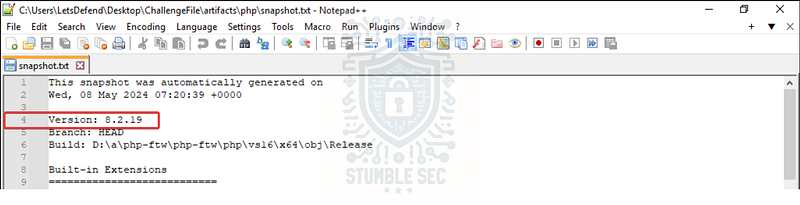
Right at the top, we see some snapshot information that contains the version number of PHP. It seems like we’re on the right track, but let’s go a step further and verify by executing php.exe since we have it available, passing the -v parameter. To do this, open the Windows Command Prompt and run the following command from the php directory:
php.exe -v

This double-confirms our earlier finding that the PHP version is 8.2.19.

Question 2: When PHP is configured to run as CGI, which directive in httpd.conf specifies the scripts that handle requests for PHP files?
To answer Question 2, we first need to locate the httpd.conf file. Searching the artifacts folder for httpd.conf , we’ll discover that it’s located in the Apache24 > conf folder. According to the Apache documentation:
Apache HTTP Server is configured by placing directives in plain text configuration files. The main configuration file is usually called
httpd.conf.
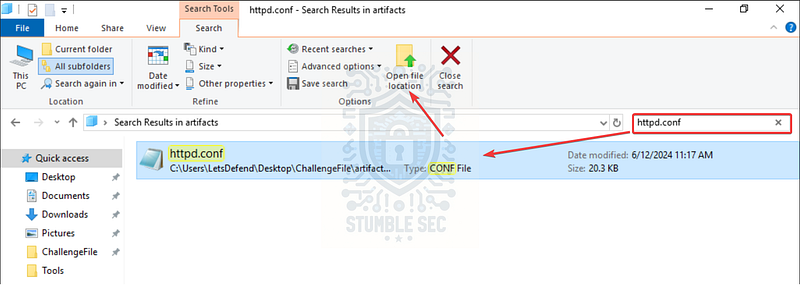
Let’s open the file in Notepad++ and search for php-cgi.exe to help us locate the correct directive.
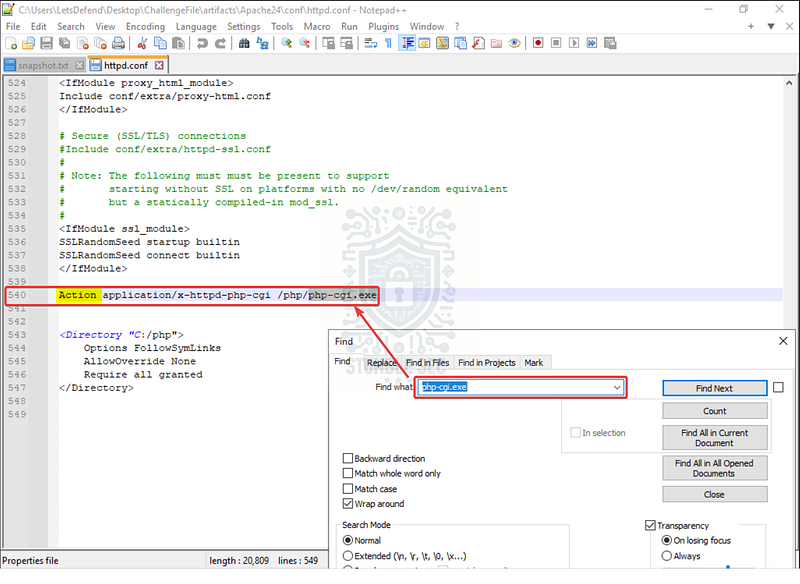
The search takes us directly to the line above. Notice the Action directive? Remember the question is asking us to find the " # “directive in httpd.conf specifies the scripts that handle requests for PHP file”— let’s do some research in the Apache docs to learn more about this directive.
The
[Action](https://httpd.apache.org/docs/2.4/mod/mod_actions.html#action)directive lets you run CGI scripts whenever a file of a certain MIME content type is requested. The[Script](https://httpd.apache.org/docs/2.4/mod/mod_actions.html#script)directive lets you run CGI scripts whenever a particular method is used in a request. This makes it much easier to execute scripts that process files.
This directive fits what we’re looking for!

Question 3: What is the IP address of the attacker who attempted to exploit our server?
To answer Question 3, we’ll need to pivot to another artifact: the access.log file within the Apache24 > logs folder.
After a cursory scan of the logs, we’ll observe several IP addresses in the log entries. However, compared to the others, one of them is making some strange requests. Notice the odd parameters included with the HTTP POST requests to /upload.php from 192.168.110.1…
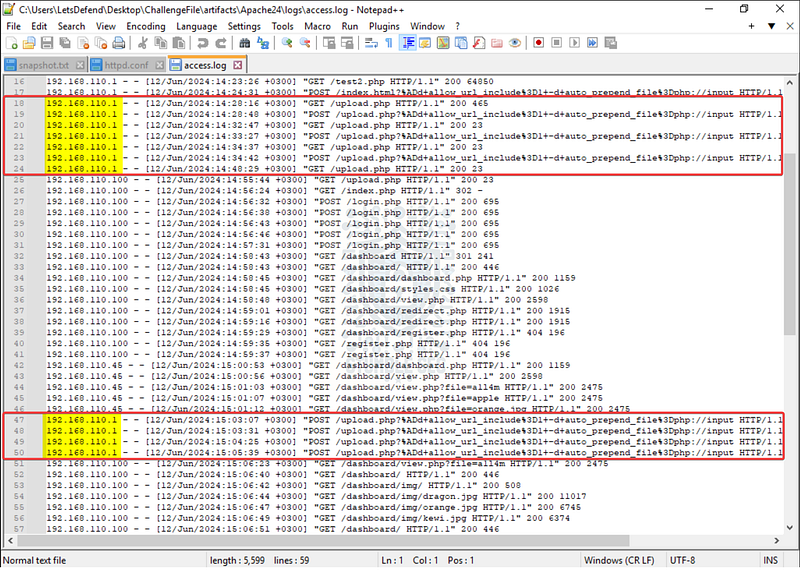

Question 4: The attacker targeted a specific page on the server with malicious payloads. Which page did the attacker target with malicious payloads?
Oh, awesome! The method that we used to discover the attacker’s IP address already provided us with the answer to Question 4!

Question 5: What version of Apache is running on the server?
Let’s move onto the other artifacts within the Apache24 > logs folder since the version information isn’t available in access.log . This time, we’ll check the error.log to see what information we can find.
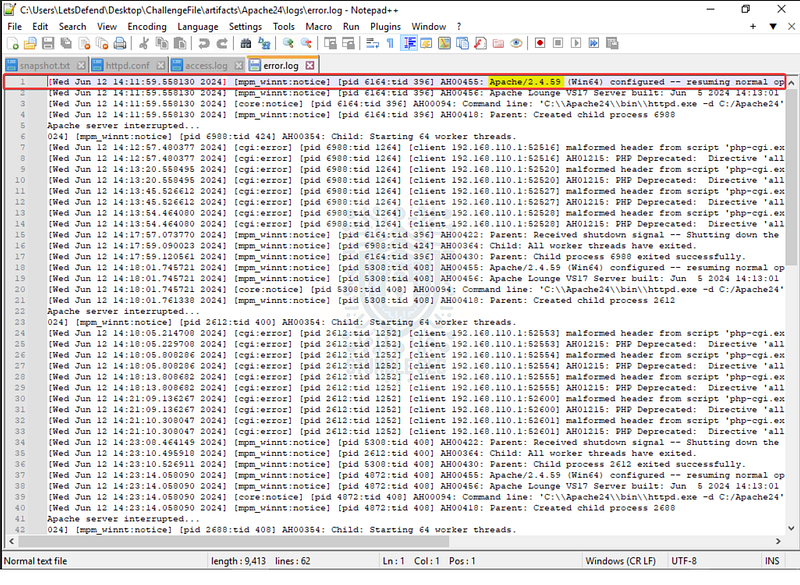
After opening this in Notepad++, we’ll see the Apache version listed on line 1.

Question 6: The attacker managed to execute commands on the server. What was the first process initiated by the attacker’s commands during their successful attempt?
Remember back in Question 1 that we noted a third set of artifacts in the prefetch folder? Now it’s time to check them out. Once the folder is open, sort the folder contents by date modified so that we can organize the timestamps more efficiently.
The folder contains the list of executables loaded into the prefetch. Remember that prefetch files are used in Windows to speed up the loading of applications. These files contain information about the applications that have been run, including their execution history, file paths, and timestamps, which is exactly what we’ll need to answer Question 6.
Because we already examined the access.log in Question 3, we already have a general timeline of when the attacker accessed the server. So, let’s start there, using the timestamps of the first event range targeting the /upload.php page.
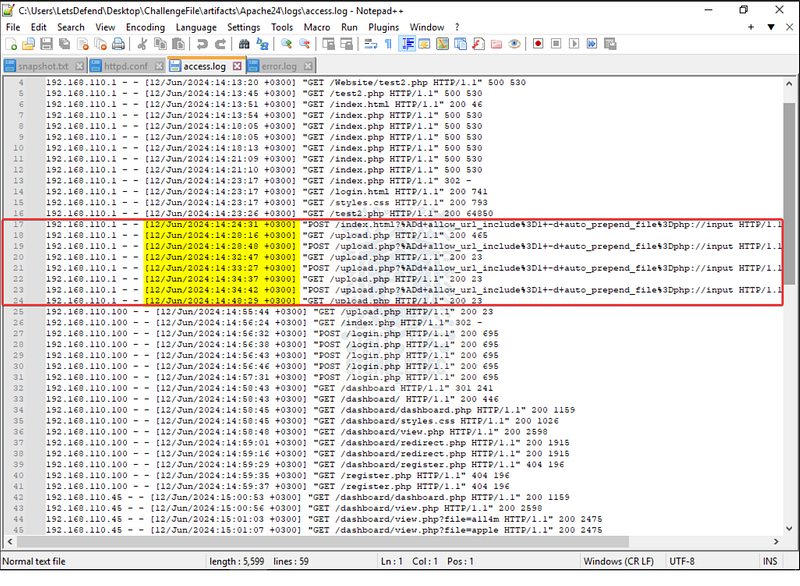
Pay special attention to the +0300 in the timestamp. This offset indicates that it’s 3 hours ahead of UTC, meaning the local prefetch timestamps could be in UTC time so they won’t match the logs exactly. For example, 14:24:31 > 11:24 AM.
Now, looking in the prefetch folder, nothing seems to match the timestamps from the first attempt…
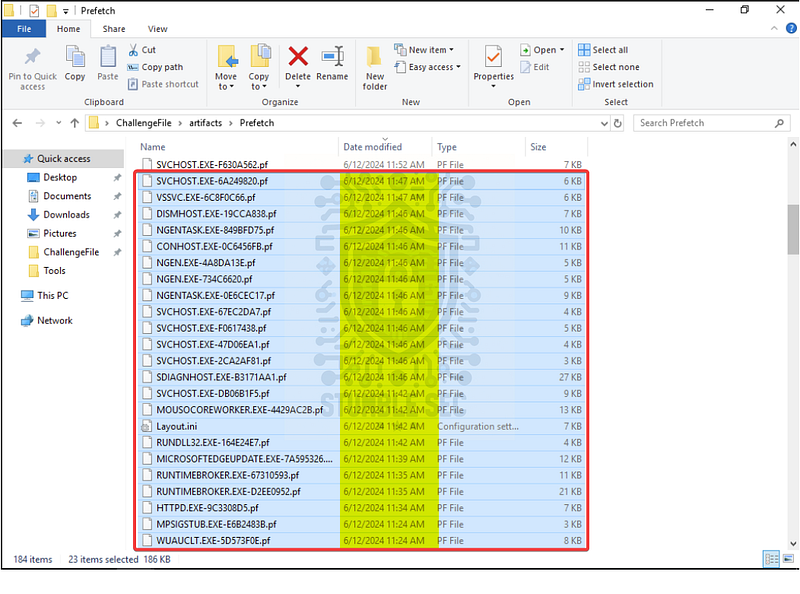
No problem! Let’s check the next set of events in the access.log with the attacker’s source IP address, and match those to the prefetch data — this gets us closer to the time of the IDS alert.
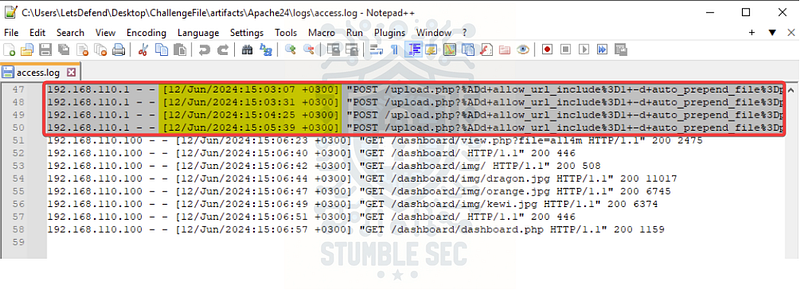
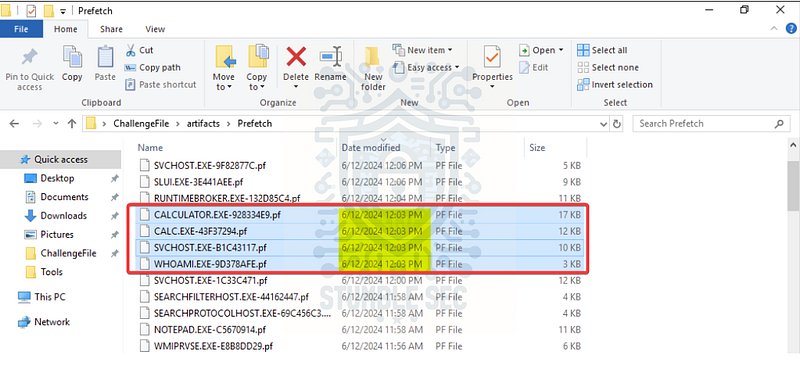
Bingo! Now we have some matching time stamps and we can see the first process executed is whoami.exe to check the username of the currently logged-in user.

Question 7: Before the attacker was detected and blocked, they executed another command, launching a new process. What process was launched by this command?
Fortunately, the steps we took to answer the last question also work for Question 7. Using the same matching prefetch timestamps, we can determine that the attacker executed another command, calc.exe , which is often used as a proof-of-concept demonstrating remote code execution

Question 8: What is the CVE number of the exploit used by the attacker?
Now let’s put everything we’ve learned together and determine which CVE the threat actor exploited. To recap:
- The compromised web server is running PHP 8.2.19.
- PHP is running as CGI on Windows.
- The attacker’s payload targeted the
/upload.phppage. - The attacker executed
whoamiandcalc.exe, indicating we are looking for a remote code execution.
Let’s do a Google search with these parameters to see what information we can discover:
php cgi 8.2.19 windows remote code execution vulnerability
The answer is — a lot! We can select any number of the returned links to learn about this vulnerability, but all of them refer back to the disclosure write-up from the DEVCORE Research team. The referenced PoC for CVE-2024€“4577 looks very familiar based on what we saw in our logs.
Security Alert: CVE-2024-4577 - PHP CGI Argument Injection Vulnerability | DEVCORE 戴夫寇爾 _While implementing PHP, the team did not notice the Best-Fit feature of encoding conversion within the Windows…_devco.re
PHP RCE: A Bypass of CVE-2012-1823, Argument Injection in PHP-CGI _Hi, I am Orange Tsai from DEVCORE Research Team. We recently found a vulnerability on PHP. We have reproduced the…_github.com

Conclusion:
There we have it! Using the PHP logs, we discovered that the web server was running a version of PHP vulnerable to CVE-2024€“4577. After that, we leveraged the Apache logs to discover the attacker’s IP address, what web page was targeted, then correlated the data with the Windows Prefetch to uncover evidence of remote code execution. Now that we have scoped the attack and completed our objectives, let’s close out this walkthrough of the PHP-CGI (CVE-2024€“4577)!
Another big thank you to LetsDefend for continuing to provide these awesome labs. I chose this challenge to better understand how web servers work and see what logs are available during incident response. I appreciated that the discovery process built a catalog of evidence that could be used to locate the applicable CVE number. It was a fun process to do the detective work based on the clues. After going through this challenge, I’ve gained a better understanding of this vulnerability and assembled valuable resources to tackle the triage process in the real world.
Thanks for the support and going through this investigation with me. Remember, if you found this walkthrough helpful don’t forget to give it a clap! Your feedback really is invaluable and helps fuel my commitment to support your journey in the security community. Cybersecurity is a team sport and we’re in this together!
Until next week’s challenge — stay curious and be safe out there!

Tools & References:
PHP Manual: PHP: Introduction — Manual
Apache Documentation: Configuration Files — Apache HTTP Server Version 2.4
Devcore Blog — Security Alert: CVE-2024€“4577 — PHP CGI Argument Injection Vulnerability: https://devco.re/blog/2024/06/06/security-alert-cve-2024-4577-php-cgi-argument-injection-vulnerability-en/?ref=labs.watchtowr.com
PHP Security Advisories GitHub: https://github.com/php/php-src/security/advisories/GHSA-3qgc-jrrr-25jv
National Vulnerability Database (CVE-2024€“4577): https://nvd.nist.gov/vuln/detail/cve-2024-4577