LetsDefend — Learn Sigma Challenge Walkthrough
A Beginner’s Challenge in Sigma Rule Analysis.

https://app.letsdefend.io/challenge/learn-sigma
Introduction:
Welcome to my weekly walkthrough! If you’ve stumbled across this blog while looking for a detailed guide to the Learn Sigma challenge from LetsDefend, you’re in the right place. If you’ve ever been curious about Sigma rules or how to read them, this beginner-friendly challenge is for you!
Challenge Scenario:
Your organization has detected a ransomware infection on one of its critical systems, and it is imperative that you address this issue immediately. This type of malware searches for valuable files, such as sensitive documents and configuration files, and encrypts them using a strong encryption algorithm.
The investigation has revealed that the ransomware may have used the Windows utility bitsadmin.exe to download additional malicious payloads or communicate with its command-and-control (C2) server.
Your task is to carefully review the Sigma rule, answer the related questions, and understand how different rule sections (selection, condition, fields, tags, logsource) work together to detect malicious activity.
For this challenge, we’re putting on our detection engineering hats and need to leverage a Sigma rule to analyze logs related to a ransomware infection. But first, we need to review the rule, understand how it works, and clarify what’s in scope — just to be sure we don’t miss anything.
If any of this sounds new or confusing, don’t worry! I’ll walk through each step clearly, and by the end, you’ll have a solid understanding of how to approach similar investigations in the wild. Sounds like fun, right? Let’s get into it!
And if you find this walkthrough helpful — whether it levels-up your skills, gets you over a stumbling block, or just serves as a handy reference — please give it a clap and consider following me for more content like this.
Thanks for reading and going on this investigation with me!
Sigma Rules 101:
Before we jump into this challenge, let’s have a quick, informational overview of what Sigma rules are and how they’re structured to better inform our answers. For this, we’ll lean on the excellent Sigma documentation available here:
Explore Sigma _A generic and open signature format that allows you to describe relevant log events in a straight-forward manner._sigmahq.io
From the documentation, we can understand that Sigma rules are " # "
_YAML_ files that contain all the information required to detect odd, bad or malicious behaviour when inspecting log files €“ usually within the context of a SIEM_.“Put another way, Sigma rules can be used to identify targeted suspicious or malicious activity by matching patterns against log data.
To organize these rules in a uniform schema, Sigma rules contain three primary sections:
- Detection: " # “What malicious behaviour the rule searching for.“2. Logsource: " # “What types of logs this detection should search over.“3. Metadata: " # “Other information about the detection.“With this basic understanding, we’re well-equipped to take on this challenge and analyze the Sigma rule! I encourage you to check out the documentation if you’re curious and want more detailed information. Let’s get to it!
Question 1: Which executable file was specifically targeted by this Sigma rule?
Go ahead and open the ChallengeFile folder, where we’ll find the Sigma rule contained in the proc_creation_win_bitsadmin_download.yml. This is the YAML file we’ll need to analyze.
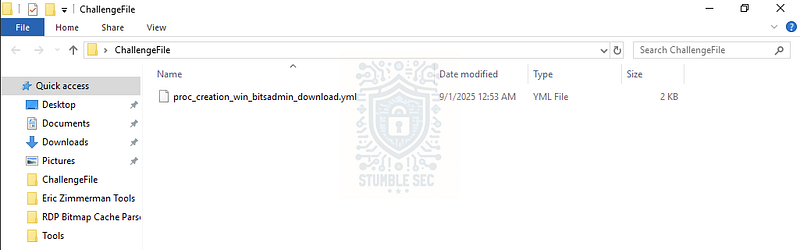
To review the contents, we can open the YAML file in a text editor. For this walkthrough, I’ll be using Notepad++ since it makes it easier to view and explain structured files like this. With the file open, we need to identify which executable file is targeted by the rule.
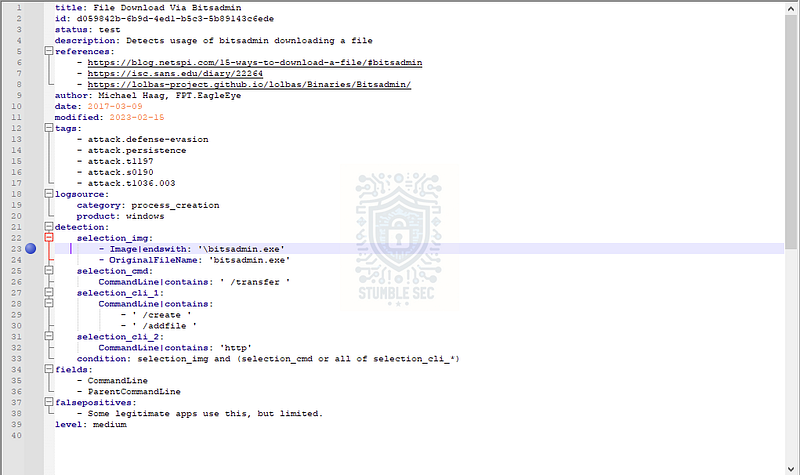
Notepad++: Identifying the executable file targeted by the Sigma rule
On line 23, under the Detection section, we can see that in the selection_img field, the rule is targeting bitsadmin.exe. Bitsadmin is a legitimate Windows binary used to create, download, or upload jobs and to monitor their progress. However, it can also be abused by attackers to download malware or other malicious payloads (see MITRE ATT&CK T1197 — BITS Jobs).

Question 2: What command-line option is used to indicate a file transfer in this rule?
Next, we need to determine which Bitsadmin command-line option is used to perform a file transfer with the tool. We can find this on line 26, where the selection_cmd field is targeting the /transfer command-line switch.
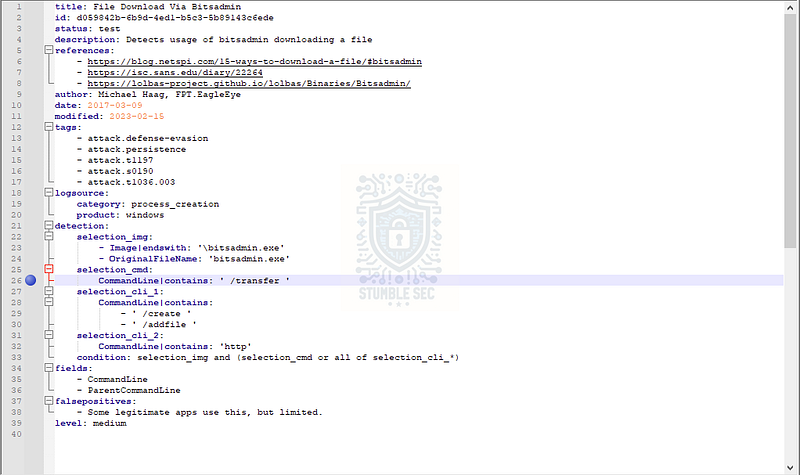
Notepad++: Identifying the command-line option in the Sigma rule
The presence of the /transfer switch tells us that the rule is searching for the use of bitsadmin in the context of file transfer activity.

Question 3: What logical expression in the condition field combined the criteria to trigger this rule?
To answer Question 3, we’ll need to identify the logical expression in the condition field that defines the criteria for the rule to trigger. This combination ties together the definitions we explored in the previous questions to build the rule’s logic.
We can find the condition field on line 33, where it shows:
selection_img and (selection_cmd or all of selection_cli_*)
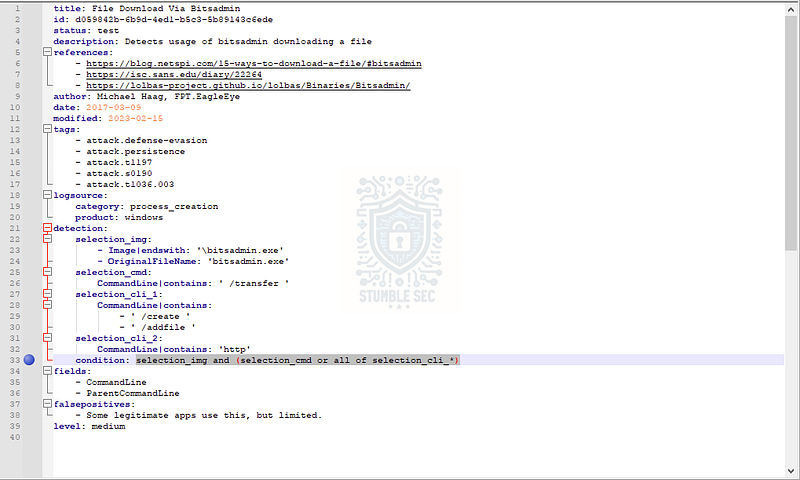
Notepad++: Identifying the condition field in the Sigma rule
So, what does this mean? It means the detection rule is searching for bitsadmin.exe activity with the /transfer argument or where the CommandLine field contains /create, /addfile, and http—all of which are strong indicators of file download activity.

Question 4: Which specific field did this rule capture that shows the command being executed?
We touched on this in Question 2, but to answer Question 4 we need to determine the specific field the rule captures that shows the command being executed.
We can find this information on line 34, under the fields section of the rule.
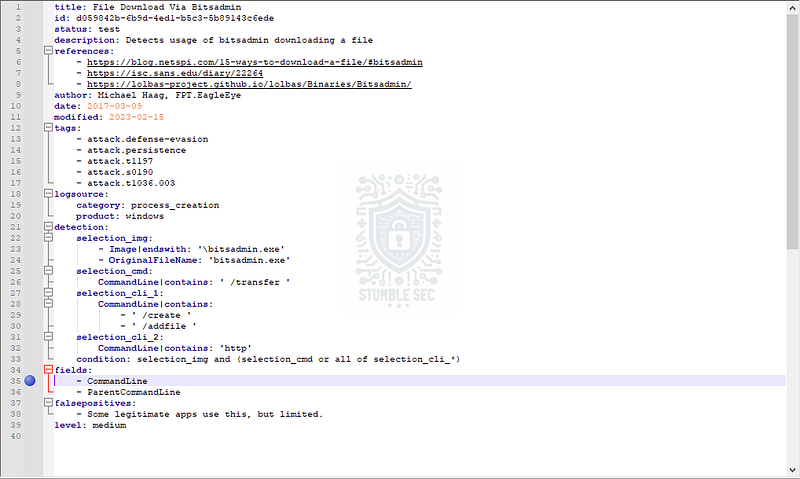
Notepad++: Identifying the CommandLine field in the Sigma rule
This tells us that the CommandLine field must be present for the rule to run. That field is where the rule looks for command-line definitions like /transfer, or the combination of values in the selection_cli_* group — including /create, /addfile, and http.

Question 5: Which single ATT&CK tactic tag is listed first in this rule?
To answer Question 5, we’ll turn our attention to the Metadata section near the top of the rule. Under the tags field, we’ll see a list of ATT&CK tactic and technique references.
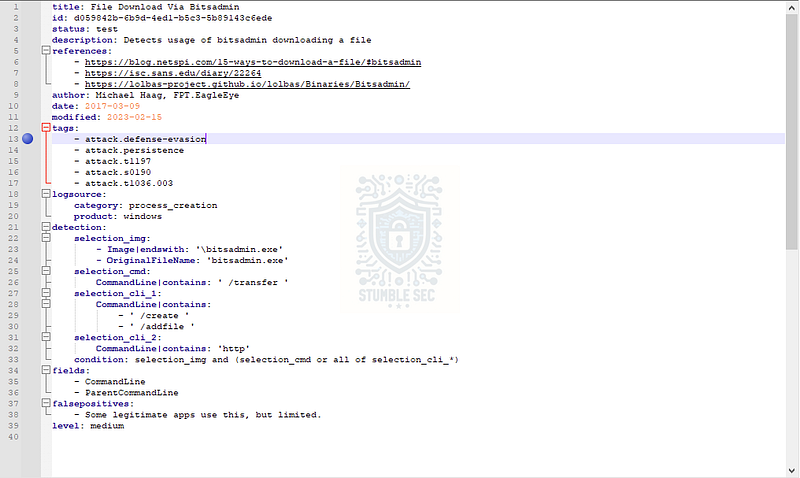
Notepad++: Identifying the first MITRE ATT&CK tactic listed in the Sigma rule
The answer to the question is the first item in the list on line 13: attack.defense-evasion. The attack. prefix tells us this is a MITRE ATT&CK reference. In this case, the first tactic listed is TA0005 €“ Defense Evasion:
Defense Evasion _Build Image on Host Adversaries may build a container image directly on a host to bypass defenses that monitor for the…_attack.mitre.org

Question 6: What is the primary category of events that this Sigma rule was written to monitor?
The next component of this Sigma rule we need to analyze is the Logsource section, starting on line 18. Remember from our Sigma overview that this section “is used to specify what log data should be searched by the rule.”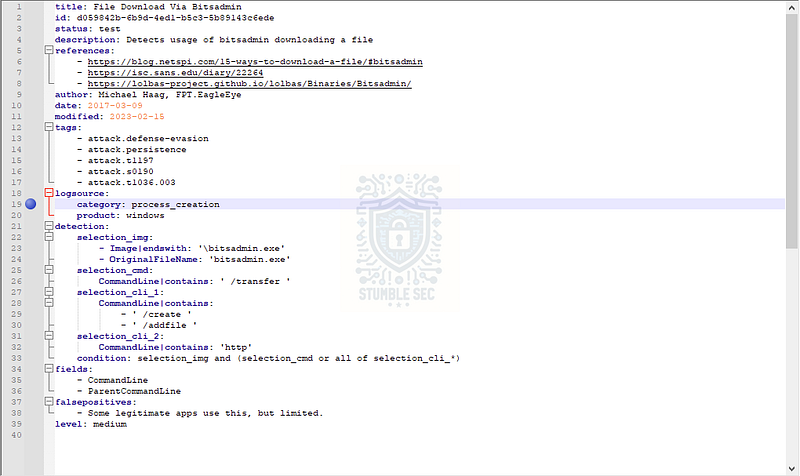
Notepad++: Identifying the primary Logsource category in the Sigma rule
The category field indicates the type of events being monitored. In this case, the rule is written to detect Windows process creation events (usually Event ID 4688), which is a common source for identifying suspicious command-line execution — keep that one in your back pocket!

Question 7: What specific command-line argument did this rule look for to identify HTTP-based downloads?
We touched on command-line arguments targeted by the rule back in Question 3 and Question 4. Recall that one of the conditions included a check for http.
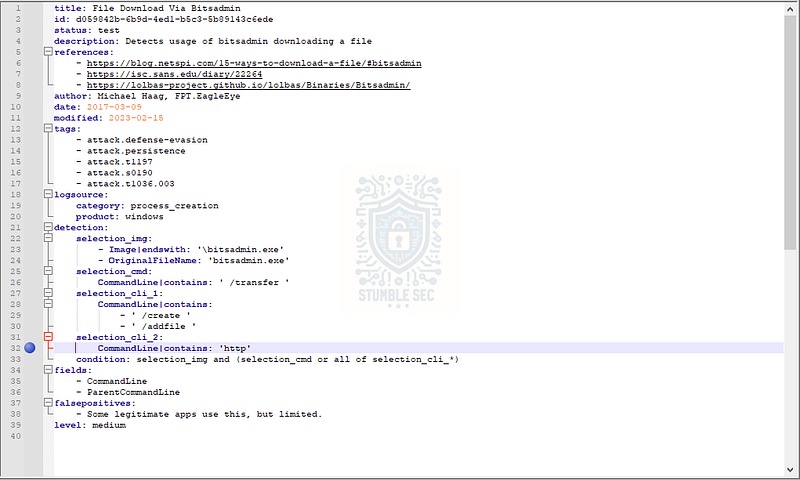
Notepad++: Identifying the http command-line option in the Sigma rule
This helps identify suspicious or malicious use of bitsadmin to grab payloads over HTTP.

Question 8: Which command-line option must be present to create a new transfer using bitsadmin?
We’ve made it to the last question of our Sigma rule analysis — nice job! The final object we need to identify is another one we touched on in Question 3 and Question 4.
To answer Question 8, we’ll want to look at line 29, which shows the /create value. In the context of bitsadmin, the /create argument is used to initiate a new transfer job — which is exactly what we need to wrap up our analysis!
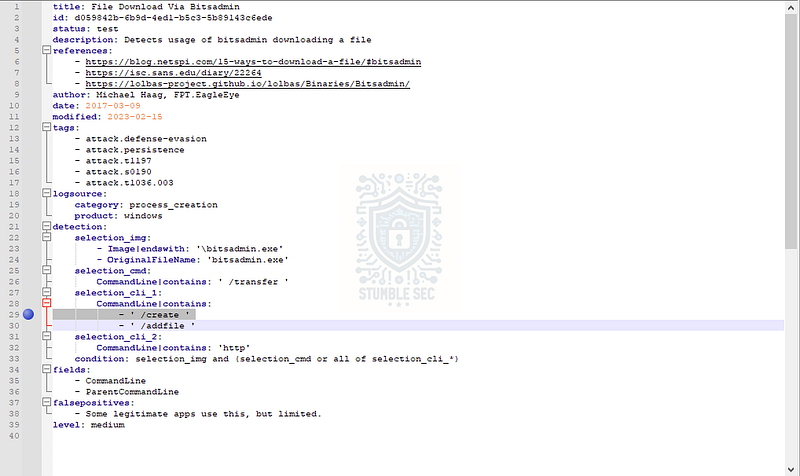
Notepad++: Identifying the /create command-line option in the Sigma rule

Conclusion:

How fun was that? A big thank you to LetsDefend for putting together another solid, beginner-friendly challenge.
This investigation was a great introduction to Sigma rules and how they’re used to detect suspicious behavior in log data. We explored how rules are structured, how they leverage fields like CommandLine, and how they align with MITRE ATT&CK tactics like Defense Evasion. From identifying the use of bitsadmin.exe, to parsing command-line arguments like /transfer, /create, and http, this challenge gave us a hands-on look at how Sigma expresses detection logic in a readable, flexible format.
I chose this challenge to sharpen my detection engineering workflow and get reacquainted with Sigma’s YAML structure, since I don’t typically work with Sigma rules directly. Instead, I usually convert them to my required SIEM or log format for the application at hand — which can be really helpful if you want to leverage Sigma rules but use a different solution like Splunk, Microsoft, Elastic, etc.
This challenge was also a great opportunity to slow down and take the extra time to research the answers, not just search for them. That deeper dive helped me build a true understanding of how the rule works and why each component matters. Awesome stuff!
Thanks for your support and partnering on this investigation. If you found this walkthrough helpful, don’t forget to give it a clap and consider following me for more content like this! Your feedback really is invaluable, and it pumps me up to support your security journey. Remember, Cybersecurity is a team sport and we’re in this together!
Until next week’s challenge — stay curious and be safe out there!

Tools & References:
Challenge Link: https://app.letsdefend.io/challenge/learn-sigma
Notepad++: https://notepad-plus-plus.org/
Sigma GitHub: https://github.com/SigmaHQ/sigma
Sigma Documentation: https://sigmahq.io/docs/basics/rules.html
Microsoft Learn — Bitsadmin: https://learn.microsoft.com/en-us/windows-server/administration/windows-commands/bitsadmin
MITRE ATT&CK — BITS Jobs (T1197): https://attack.mitre.org/techniques/T1197/
MITRE ATT&CK — Defense Evasion (TA0005): https://attack.mitre.org/tactics/TA0005/