LetsDefend — Golden Ticket Challenge Walkthrough
Investigating Domain Controller Logs Using Event Log Explorer and MITRE ATT&CK.

Image Credit: https://app.letsdefend.io/challenge/golden-ticket
Introduction:
Welcome to my weekly walkthrough! If you’ve stumbled across this blog while looking for a detailed guide to the Golden Ticket challenge from LetsDefend, you’re in the right place. Stick around to learn a little bit about detecting Golden Ticket attacks in Active Directory.
Challenge Scenario:
An alert has been triggered within a network, indicating a possible attack on the Domain Controller (DC). The security team has detected suspicious activity suggesting lateral movement attempts from a compromised workstation to the DC. The attacker, identified as having infiltrated the network, appears to be targeting sensitive systems. An investigator is tasked with analyzing network traffic, reviewing event logs, and identifying how the attacker is navigating through the environment. The goal is to trace the attacker’s steps, determine their access point, and prevent further escalation to the Domain Controller.
For this challenge, we’re putting on our incident response hats. An alert points to lateral movement from a compromised workstation to the Domain Controller. Not good! Our job is to quickly figure out what the attacker did by hunting through the logs and following their trail.
We’ll work from a single artifact: the Windows Security Event Log, and use Event Log Explorer to filter and correlate the attacker’s authentication activities. The goal is to identify whether a Golden Ticket was forged and pin down the accounts, timestamps, and logon types to support our case.
By the end of this thing, you’ll have a repeatable approach for spotting Active Directory attacks like AS-REP roasting and suspected Golden Ticket usage from just a domain controller’s security log. Time to turn those noisy logs into a clean timeline of the attack — let’s go!
And if you find this walkthrough helpful — whether it levels-up your skills, gets you over a stumbling block, or just gives you a clearer view of the blue team side of incident response — please give it a clap and consider following me for more content like this.
Thanks for reading and going on this investigation with me!
Golden Ticket Basics:
Before we jump too far into the investigation, let’s lay some groundwork and do a quick recap of what a Golden Ticket is in the context of a domain controller. This will help us contextualize the investigation as we go through it.
In an Active Directory environment, modern authentication is handled using Kerberos. We don’t need to go terribly in-depth, since there are excellent resources for deeper dives if you want to research further. The idea is that when a client in an Active Directory environment needs to access a resource or log in to a server, an authentication flow takes place using Kerberos. Here’s a quick visual from Microsoft Learn:
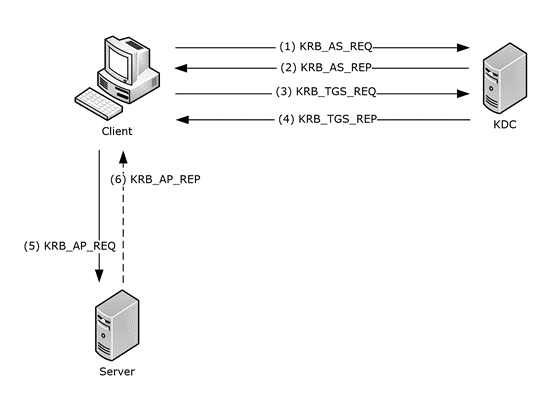
For the context of a Golden Ticket attack, remember that Kerberos uses tickets to validate client identity in the form of a Ticket Granting Ticket (TGT). A TGT is issued by the Key Distribution Center and encrypted/signed with the KRBTGT service account key. Put simply, compromising the KRBTGT hash lets an attacker forge TGTs that look legitimate to the KDC and then use them to request service tickets (TGS) for specific resources even as highly privileged accounts like a domain administrator.
Here’s a concise, authoritative description from MITRE ATT&CK (Steal or Forge Kerberos Tickets: Golden Ticket — T1558.001):
Adversaries who have the KRBTGT account password hash may forge Kerberos ticket-granting tickets (TGT), also known as a golden ticket.[1] Golden tickets enable adversaries to generate authentication material for any account in Active Directory.[2]
Using a golden ticket, adversaries are then able to request ticket granting service (TGS) tickets, which enable access to specific resources. Golden tickets require adversaries to interact with the Key Distribution Center (KDC) in order to obtain TGS.[3]
The KDC service runs all on domain controllers that are part of an Active Directory domain. KRBTGT is the Kerberos Key Distribution Center (KDC) service account and is responsible for encrypting and signing all Kerberos tickets.[4] The KRBTGT password hash may be obtained using OS Credential Dumping and privileged access to a domain controller.
So, in the context of our investigation, we have an alert that a domain controller was compromised after lateral movement, which could give the attacker access to KRBTGT. Our job will be to identify whether a Golden Ticket was forged and used to escalate the attacker’s privileges to a higher level, like a domain administrator. Now that we’ve set the stage, let’s get into the investigation!
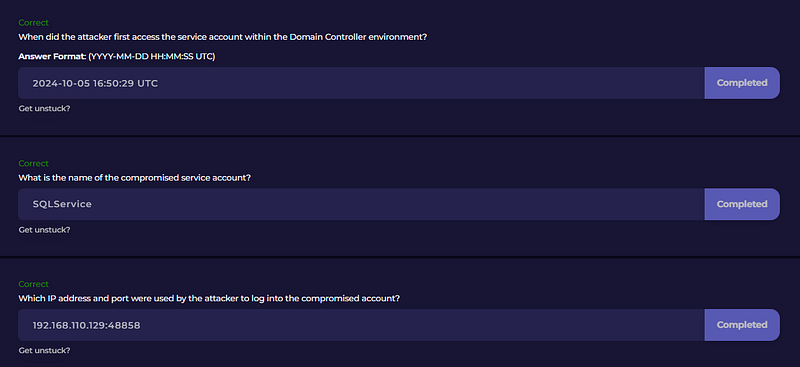
Questions 1, 2, & 3:
When did the attacker first access the service account within the Domain Controller environment?
What is the name of the compromised service account?
Which IP address and port were used by the attacker to log into the compromised account?
Let’s kick off this investigation and determine what the attacker was after. First, extract goldenticket.7z from the ChallengeFile folder. This leaves us with a single artifact: a copy of the Windows Security Event Log from the compromised domain controller — Security.evtx.
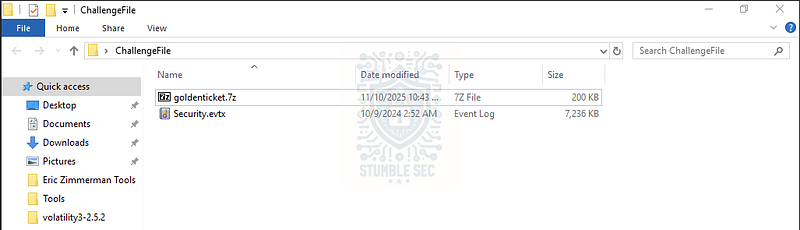
Overview of the challenge artifacts
The first thing we need to home in on is malicious login activity contained in the log. For this, we can open this in Windows Event Viewer, or we can use Event Log Explorer, a third-party utility that speeds up event log analysis. Since Event Log Explorer is already built into the LetsDefend analysis environment, I’ll be using it for this walkthrough.
Next, open Event Log Explorer and load the Security.evtx file. To quickly identify the first malicious login, we can then apply some filtering to surface exactly what we need.
Start with broad strokes by filtering for Event ID 4624 (Successful Logon). You can access filtering options by pressing the filter button on the Event Log Explorer toolbar, then entering 4624 into the Event ID(s) field.
Since we’re specifically searching for a service account login, we might guess that the account name contains the string service. Add a custom parameter in the description params tab: select new logon\account name, set the operator to contains, and the value to service.
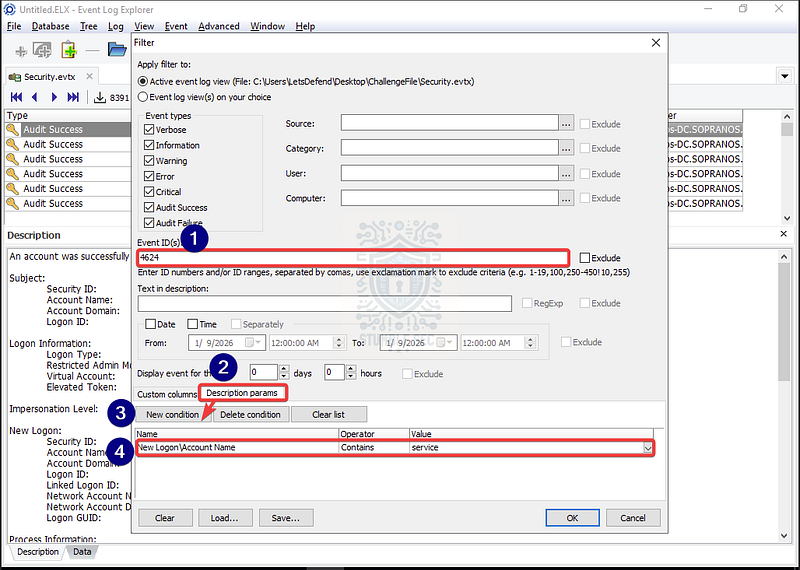
Event Log Explorer: Filtering successful login events containing the Account Name " # "
service"
Once we apply the filter, our event list becomes much more manageable. Because this investigation is in the context of a remotely accessed service account, we further whittle down results by discarding interactive (type 2) logons and searching for network logons (type 3) which is common with accessing services over the network.
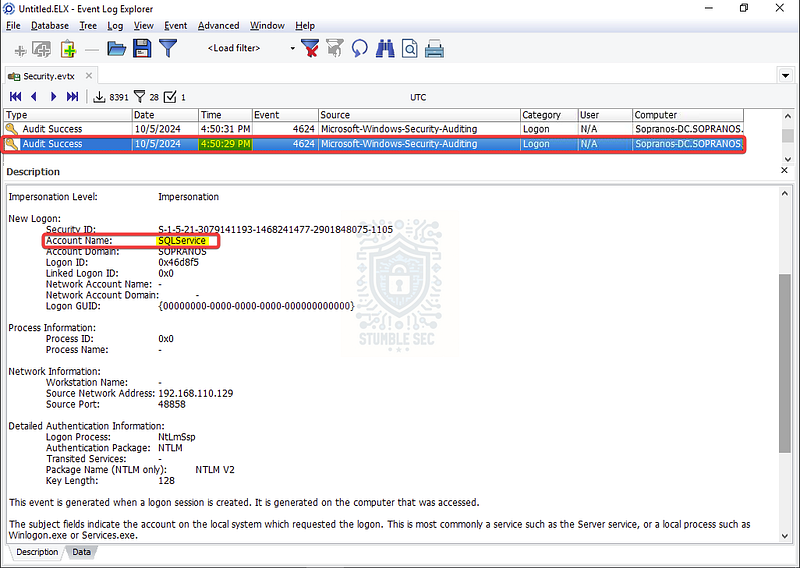
Event Log Explorer: Identifying the first successful login for SQLService
This will lead us to stumble upon the key logon event above. In the Account Name field, we’ll find a 4624 network logon for the service account SQLService. That gives us the likely answer to Questions 1 & 2. Even better, 4624 events include Network Information fields such as Source Network Address and Source Port, which reveal where and how the logon originated. Those fields will provide the answer to Question 3 — nice!
Questions 4 & 5:
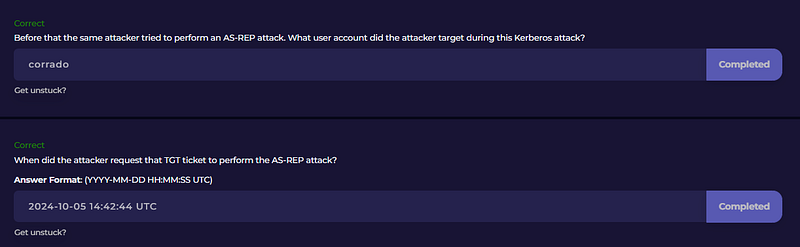
Before that the same attacker tried to perform an AS-REP attack. What user account did the attacker target during this Kerberos attack?
When did the attacker request that TGT ticket to perform the AS-REP attack?
Now that we’ve established some baseline timestamps and uncovered indicators of attack, we’ll turn our attention to the attacker’s earlier technique — AS-REP Roasting.
Before we blindly pour through the logs, let’s turn to the MITRE ATT&CK entry for this tactic for context: Steal or Forge Kerberos Tickets: AS-REP Roasting (T1558.004)
Adversaries may reveal credentials of accounts that have disabled Kerberos preauthentication by Password Cracking Kerberos messages. For each account found without preauthentication, an adversary may send an AS-REQ message without the encrypted timestamp and receive an AS-REP message with TGT data which may be encrypted with an insecure algorithm such as RC4.
Think back to the Kerberos diagram we reviewed earlier. The AS-REQ and AS-REP are the first steps in the Kerberos authentication flow. AS-REP roasting is possible in an Active Directory domain when an account has pre-authentication disabled. With pre-authentication enabled, the user’s AS-REQ includes a timestamp encrypted with the hash of their password and the DC must decrypt it before issuing an AS-REP containing a TGT. When an account doesn’t require this pre-authentication, attackers can just send an AS-REQ, snag the AS-REP, and then brute-force the encrypted data offline to expose credentials. Not good!
So, what does this mean for our investigation? Another useful resource in MITRE ATT&CK is the detection strategy for these attacks. It recommends hunting for:
Detects AS-REP roasting attempts by monitoring for Kerberos AS-REQ/AS-REP authentication patterns where preauthentication is disabled (Event ID 4768 with Pre-Auth Type 0). Correlates these requests with subsequent service ticket activity (Event ID 4769) and anomalies such as requests using weak RC4 encryption (etype 0x17).
Let’s put this into action in Event Log Explorer and search for:
- TGT requests: Event ID
4768withPreAuthType = 0 - Service ticket activity: Event ID
4769whereTicketEncryptionType = 0x17to spot legacy RC4 usage
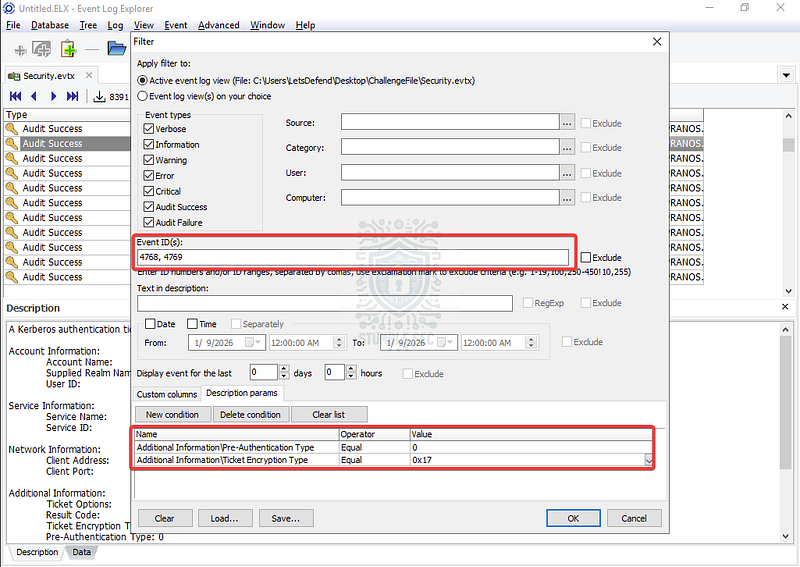
Event Log Explorer: Filtering for AS-REP roasting targets
Bingo! When you apply these filters, you’ll find exactly one matching hit: a single 4768 event that matches the detection conditions. That event contains what we need to answer Questions 4 & 5.
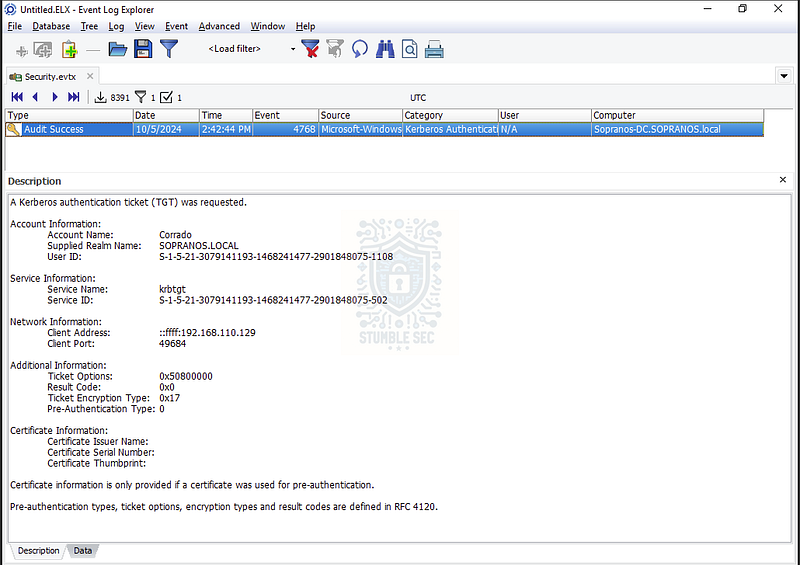
Event Log Explorer: Stumbling across a matching event log
Questions 6 & 7:
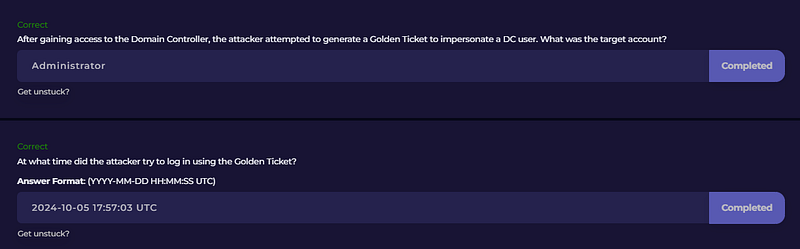
After gaining access to the Domain Controller, the attacker attempted to generate a Golden Ticket to impersonate a DC user. What was the target account?
At what time did the attacker try to log in using the Golden Ticket?
On to the last two questions! We’re looking for another successful login event that might indicate attempted use of a Golden Ticket, impersonating another user in the domain. Since the question tells us we’re looking after the attacker gained access to the domain controller, let’s apply some focused filtering in Event Log Explorer:
- Filter Event IDs:
4624(Successful Logon) and4768(TGT requests) - Time window: Events on the day of the attack after the event we found in Question 5
- Exclude previously identified accounts: Filter out
Corrado - Exclude computer accounts: Remove
SOPRANOS-DC$to focus only on user accounts
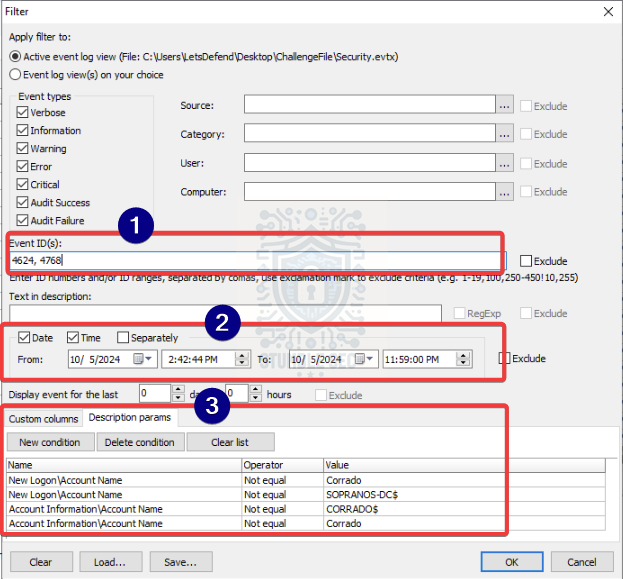
Event Log Explorer: Applying filters to reduce the noise
With these filters applied, we’ll identify activity for the Administrator account — a juicy target for an attacker looking for the keys to the kingdom. Let’s focus on this account now.
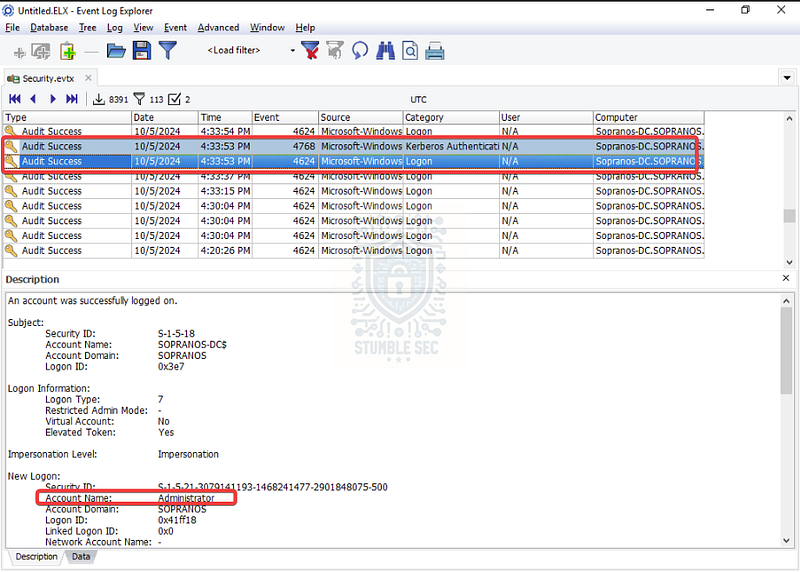
Event Log Explorer: Identifying an Administrator user in the event logs
To correlate associated Administrator activity, expand the filtered event set to include 4768, 4769, 4624, and 4625 (logon failure), add Administrator to the Text in description field, and clear any description parameters we used earlier so we don’t suppress relevant fields.
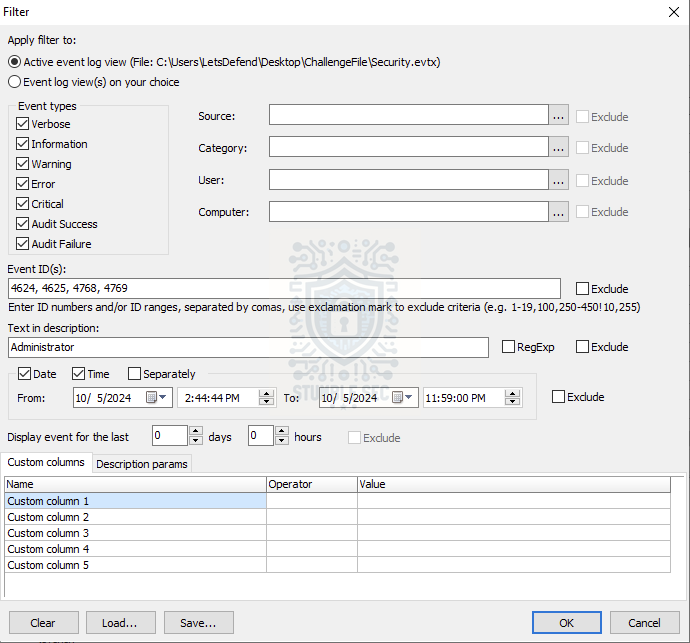
Event Log Explorer: Filtering for Administrator activity
From the results, something looks odd. Between 5:04:23 PM and 5:41:28 PM, we discover dozens of 4769 (service ticket request) events, a couple of 4768 (TGT) events, and several 4625 logon failures for Administrator. In other words, this looks suspiciously like testing or enumeration noise from the attacker.
Then we hit what really tips us off: at 5:57:03 PM there’s a clean sequence that ends in a successful logon: 4768 → 4769 → **4624**.
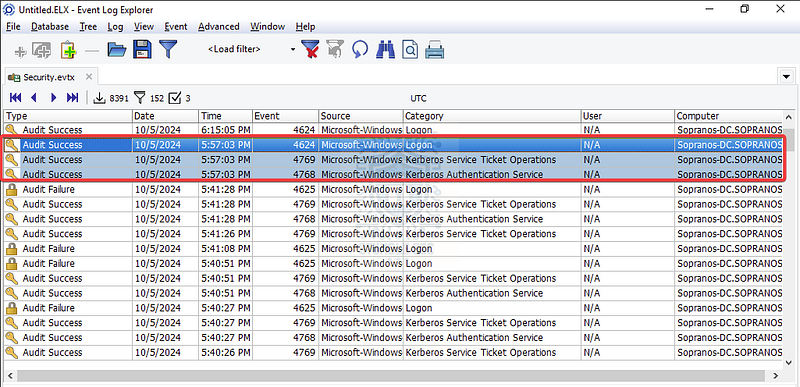
Event Log Explorer: Identifying a suspicious logon event sequence
This 4624 is Logon Type 2 (interactive). That isn’t the usual network pattern we often see with Golden Ticket use (typically surfaces as Logon Type 3 on a target server), but it differs from the earlier Type 7 unlocks we observed for this account and lands right after the suspicious 4769/4625 activity. That contrast is enough to treat it as a strong lead.
Since we’re absent any other clues indicating a Golden Ticket like a Logon GUID of {00000000-0000-0000-0000-000000000000}, odd ticket options, or a missing preceding TGT request, we’ll treat this as an educated guess: the Administrator logon at 5:57:03 PM is the most likely moment the attacker successfully authenticated using forged credentials, following the enumeration we observed.
It’s not perfect evidence, but the timing, the switch to Logon Type 2, and the 4769/4625 pattern make it the best option to prove our case. Let’s see if we’ve got it right!
Conclusion:

How fun was that! A huge thank you to LetsDefend for dropping these awesome classic Active Directory attack challenges.
This one was a great chance to revisit Kerberos fundamentals and sharpen our incident response skills. Instead of juggling multiple artifacts, we focused on a single source, the Windows Security Event Log, and used Event Log Explorer to piece together what went down. Along the way, we uncovered an AS-REP roasting attempt, correlated suspicious ticket activity, and stumbled on a Golden Ticket use. It’s a reminder that even with limited data, careful filtering and enrichment from MITRE ATT&CK can help tie up the loose ends.
I chose this challenge to brush up on my Windows incident response skills and refresh on Kerberos, classic Active Directory attacks, and misconfiguration pitfalls like missing pre-authentication. In a cloud-native world, it’s easy to forget that these techniques like enumeration, ticket forging, and lateral movement are still widely used in real-world attacks. Knowing how to spot them is extremely handy for any blue teamer. Awesome stuff!
Thanks for your support and partnering on this investigation. If you found this walkthrough helpful — please give it a clap and consider following me! Your feedback is invaluable, and it pumps me up to support your security journey. Remember, cybersecurity is a team sport, and we’re in this together!
Until next week’s challenge — stay curious and be safe out there!

Tools & References:
Challenge Link: https://app.letsdefend.io/challenge/golden-ticket
Event Log Explorer: https://eventlogxp.com/
**Microsoft Learn — " # "
Kerberos Network Authentication Service (V5) Synopsis" :** https://learn.microsoft.com/en-us/openspecs/windows_protocols/ms-kile/b4af186e-b2ff-43f9-b18e-eedb366abf13
MITRE ATT&CK — Steal or Forge Kerberos Tickets: Golden Ticket (T1558.001): https://attack.mitre.org/techniques/T1558/001/
MITRE ATT&CK — Steal or Forge Kerberos Tickets: AS-REP Roasting (T1558.004): https://attack.mitre.org/techniques/T1558/004/
**Microsoft Learn — " # "
4768(S, F): A Kerberos authentication ticket (TGT) was requested" **: https://learn.microsoft.com/en-us/previous-versions/windows/it-pro/windows-10/security/threat-protection/auditing/event-4768
**Microsoft Learn — " # "
4769(S, F): A Kerberos service ticket was requested" :** https://learn.microsoft.com/en-us/previous-versions/windows/it-pro/windows-10/security/threat-protection/auditing/event-4769
**Microsoft Learn — " # "
4624(S): An account was successfully logged on" :** https://learn.microsoft.com/en-us/previous-versions/windows/it-pro/windows-10/security/threat-protection/auditing/event-4624