HackTheBox: Campfire-2 Sherlock Walkthrough
Detecting AS-REP Roasting Activity: Correlating Kerberos Events and Authentication Logs with Event Log Explorer

Image Credit: https://app.hackthebox.com/sherlocks/Campfire-2?tab=play_sherlock
Introduction:
Welcome to my weekly walkthrough! If you’ve stumbled across this blog while looking for a detailed guide to the Campfire-2 Sherlock from Hack The Box, you’re in the right place.
This is the second challenge in the Detecting Active Directory Attacks track and it wastes no time dropping us into a classic blue team scenario. If you’re a completionist, or just want to follow along in order, check out my walkthrough of Campfire-1:
HackTheBox: Campfire-1 Sherlock Walkthrough
Hot off the heels of a Kerberoasting event, we’re jumping back in the saddle. This time, we’re given a single forensic artifact: a domain controller security log. With just this one event log, it’s on us to figure out what’s going on, identify the user account tied to a suspicious request, and determine what actually happened in Forela’s network.
Along the way, we’ll lean on our trusty event log tool, Event Log Explorer, to filter the data and apply a MITRE ATT&CK detection strategy to dial in our results and add some helpful context. This one is a bit more focused, but it’s a classic foundational scenario that shows how far you can get with just domain controller telemetry.
And hey, if you find this walkthrough helpful, whether it helps you level up your memory forensics skills, gets you over a stumbling block, or just serves as a useful reference, consider following me for more weekly deep dives.
Thanks for reading and going on this investigation with me. Let’s go!
Challenge Scenario:
Forela’s Network is constantly under attack. The security system raised an alert about an old admin account requesting a ticket from KDC on a domain controller. Inventory shows that this user account is not used as of now so you are tasked to take a look at this. This may be an AsREP roasting attack as anyone can request any user’s ticket which has preauthentication disabled.
Setup the Analysis Environment & Extract the Challenge File:
Safety first! It’s always important when working with lab/challenge files from HtB (or any educational lab/challenge/range) to keep yourself protected by performing these tasks in a dedicated, isolated virtual machine environment. As this is a Windows-based challenge, I’m using FLARE-VM for this challenge which is “a collection of software installations scripts for Windows systems that allows you to easily setup and maintain a reverse engineering environment on a virtual machine (VM).”
To keep this write-up focused I’m going to skip the step-by-step setup of FLARE-VM but _i_f you’d like to set up your own environment, please follow the directions provided directly by FLARE-VM on GitHub.
GitHub — mandiant/flare-vm: A collection of software installations scripts for Windows systems that… _A collection of software installations scripts for Windows systems that allows you to easily setup and maintain a…_github.com
Once you have a safe virtual environment created, updated, isolated, and snapshotted, we can extract the challenge file and start the investigation!
AS-REP Primer:
Before we jump too far into the investigation, let’s lay some groundwork and do a quick recap of what an AS‑REP attack is in the context of a domain controller. This will help us contextualize the investigation as we move through it.
In an Active Directory environment, modern authentication is handled using Kerberos. We don’t need to go terribly in‑depth, since there are excellent resources for deeper dives if you want to explore it more fully. The idea is that when a client in an Active Directory domain needs to access a resource or log in to a server, an authentication flow takes place using Kerberos. Microsoft has clear visuals in its Learn documentation that walk through this exchange:
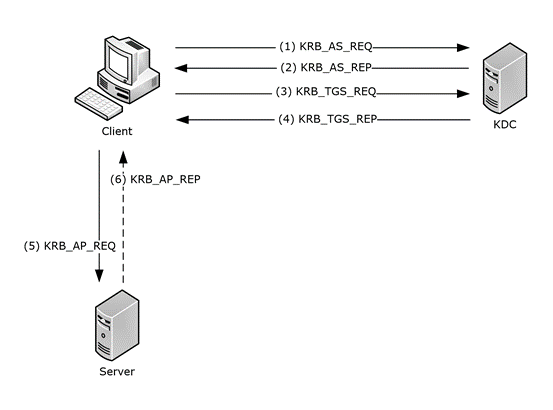
The AS‑REQ and AS‑REP are the first steps in the Kerberos authentication process. AS‑REP roasting becomes possible when an account has Kerberos pre‑authentication disabled.
With pre‑authentication enabled, the user’s AS‑REQ includes a timestamp encrypted with their password hash. The domain controller must successfully decrypt that timestamp before it will issue an AS-REP containing a Ticket Granting Ticket (TGT). This step helps prove the requester actually knows the user’s secret.
When an account doesn’t require this pre-authentication, attackers can just send an AS-REQ, snag the AS‑REP, and then brute‑force the encrypted data offline to recover the password. This is what’s called an AS-REP Roasting attack, which MITRE ATT&CK classifies under Steal or Forge Kerberos Tickets: AS-REP Roasting (T1558.004).
MITRE describes it like this:
Adversaries may reveal credentials of accounts that have disabled Kerberos preauthentication by Password Cracking Kerberos messages. For each account found without preauthentication, an adversary may send an AS-REQ message without the encrypted timestamp and receive an AS-REP message with TGT data which may be encrypted with an insecure algorithm such as RC4.
Not good! But understanding this flow is exactly what we need as we move into the investigation.
MITRE also provides helpful detection guidance. It recommends monitoring for patterns such as:
Detects AS-REP roasting attempts by monitoring for Kerberos AS-REQ/AS-REP authentication patterns where preauthentication is disabled (Event ID 4768 with Pre-Auth Type 0). Correlates these requests with subsequent service ticket activity (Event ID 4769) and anomalies such as requests using weak RC4 encryption (etype 0x17).
In other words, by combining these telemetry points and applying them to our investigation, we can start to spot activity that looks like AS‑REP roasting and begin to scope what’s really happening. Let’s give it a shot!
Question 1: When did the ASREP Roasting attack occur, and when did the attacker request the Kerberos ticket for the vulnerable user?
Let’s kick off this investigation. After extracting campfire-2.zip, we’re left with a single artifact: Security.evtx from Forela’s domain controller.
While we could analyze this log using the built‑in Windows Event Viewer, for this walkthrough I’m once again using Event Log Explorer, a third‑party utility that significantly speeds up filtering and navigation during event log analysis. It’s already installed in my lab environment, and for investigations like this, it’s hard to beat.
Once Event Log Explorer is open, load the Domain Controller security.evtx. From here, we can apply the MITRE ATT&CK detection guidance we discussed in the AS-REP Roasting primer and put it directly into practice.
To do that:
- Click the Filter button in the toolbar
- Add Event ID
4768(A Kerberos authentication ticket (TGT) was requested) - Select Description Params
- Locate Additional Information\Ticket Encryption Type
- Set the operator to Equal
- Add the value
0x17(RC4 encryption) - Locate Additional Information\Pre-Authentication Type
- Set the operator to Equal
- Add the value
0(pre-authentication disabled)
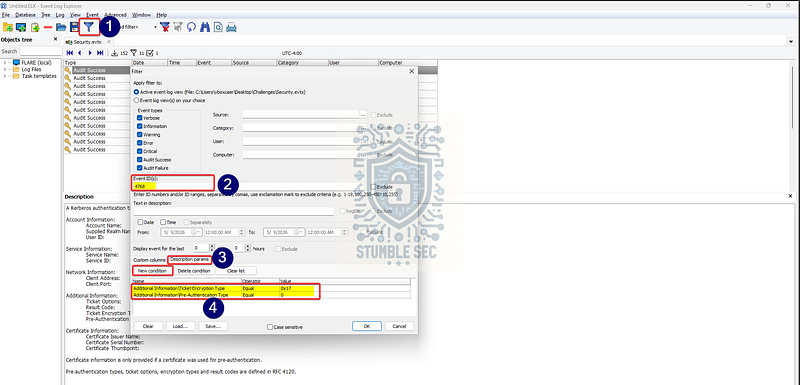
Event Log Explorer: Applying the MITRE ATT&CK detection filters to our log
After applying this filter, we’re left with exactly one matching event. That’s a strong signal and, conveniently, it’s all we need to answer Question 1.
There’s one final detail to pay attention to. The question expects the answer in UTC time. Event Viewer and many third‑party tools often display timestamps in local time by default, which can easily trip you up if you’re not careful.
To get the authoritative timestamp, double‑click the event, open the XML tab, and look for the <SystemTime> field. This value is recorded in UTC and removes any ambiguity around time zone conversion.
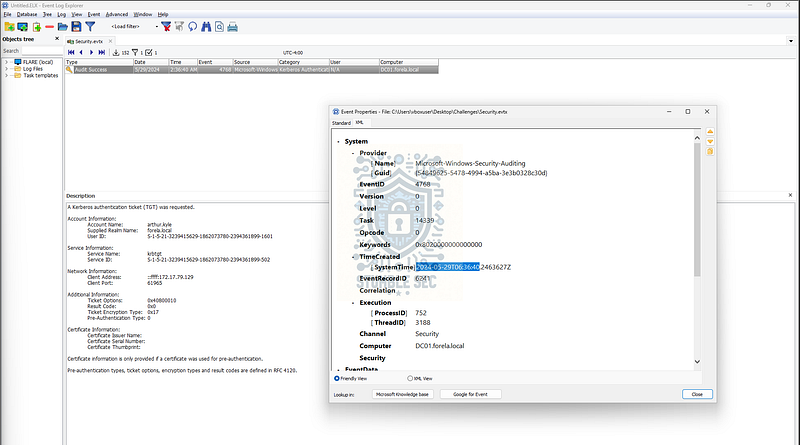
Event Log Explorer: Drilling into event properties to find the UTC SystemTime value
At this point, we’ve isolated the Kerberos authentication request that matches the conditions for a potentially AS‑REP roastable account and identified the precise UTC timestamp associated with it. With that in hand, we can confidently answer Question 1 and move forward with the investigation.

Questions 2, 3, 4:
Please confirm the User Account that was targeted by the attacker.
What was the SID of the account?
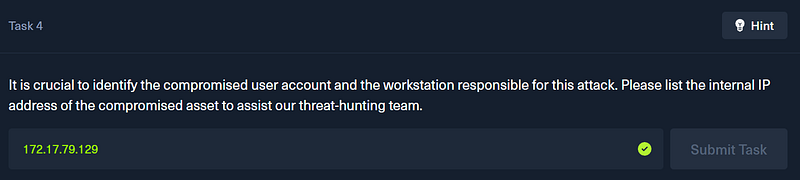
It is crucial to identify the compromised user account and the workstation responsible for this attack. Please list the internal IP address of the compromised asset to assist our threat-hunting team.
Now that we’ve identified the TGT request that exposes the right conditions for a potential AS‑REP roasting attack, we have a ton of useful forensic detail to work with. This is where Kerberos logging really starts to pay off.
Looking back at our work in Question 1, we already isolated the relevant Event ID 4768. From here, it’s just a matter of pulling the right fields from the event record.
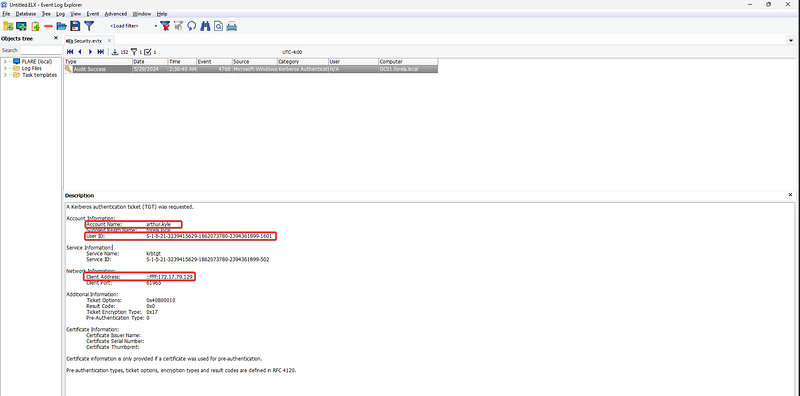
Event Log Explorer: Analyzing the event details
To answer Question 2, we can look at the Account Name field, which identifies the user account targeted in the request: arthur.kyle.
For Question 3, we’re asked to provide the Security Identifier, or SID, of that account. In Active Directory, the SID is the unique value used to identify a security principal. In this event, that value is captured in the User ID field, which gives us the SID associated with arthur.kyle.
Finally, for Question 4, we pivot to the Network Information section of the event. The Client Address field provides the source of the request. In this case, we’re interested in the IPv4 address, which represents the workstation that initiated the Kerberos authentication request. This gives us a valuable pivot point to continue the investigation and start scoping the potentially compromised system.


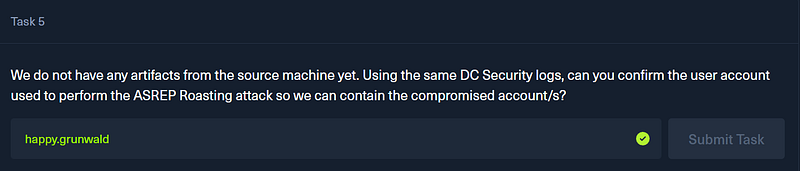
Question 5: We do not have any artifacts from the source machine yet. Using the same DC Security logs, can you confirm the user account used to perform the ASREP Roasting attack so we can contain the compromised account/s?
Remember in the detection strategy back in the primer that MITRE ATT&CK recommended correlating Event ID 4768 activity with “subsequent service ticket activity (Event ID 4769).”
This next step is doing exactly that. We’re correlating our original finding with [Event ID 4769](https://learn.microsoft.com/en-us/previous-versions/windows/it-pro/windows-10/security/threat-protection/auditing/event-4769) (A Kerberos service ticket was requested) and pivoting off the client IP address we uncovered in Question 4.
To do this, apply a new filter in Event Log Explorer:
- Scope to Event ID
4769 - Add the Description Param:
Network Information\Client Address - Operator: Contains
- Value:
172.17.79.129
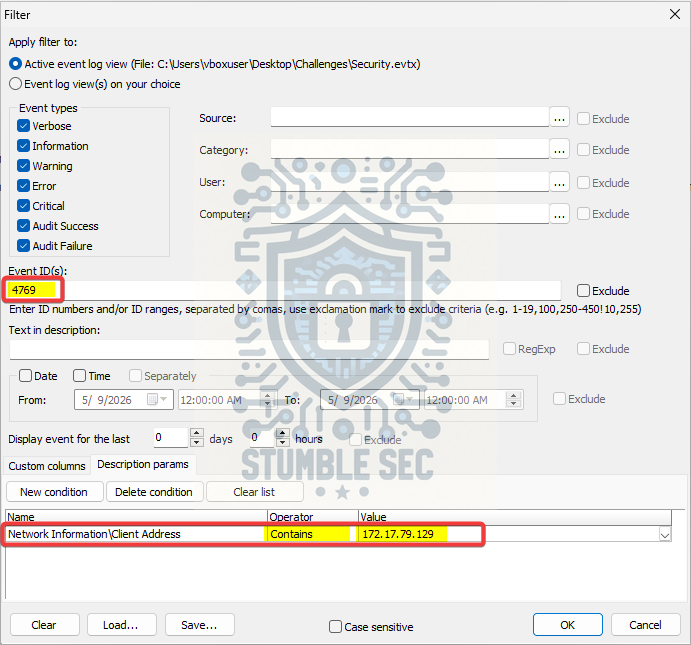
Event Log Explorer: Filtering Kerberos service ticket requests (4769) from the suspicious client
After applying this filter, we’re left with a single matching event. That gives us a clean correlation point between the source system and follow-on Kerberos activity.
Drilling into the event details, we can now identify the account associated with this request. The event shows the account name happy.grunwald, which appears to be the user context tied to the system performing the activity.
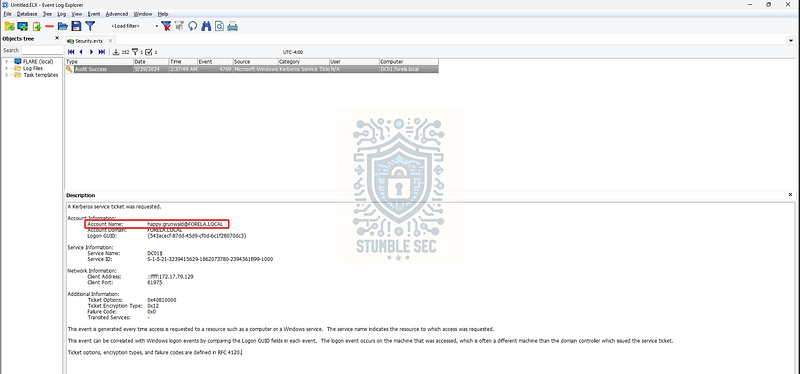
Event Log Explorer: Analyzing the event details
At this point, we’ve linked together:
- The targeted account (
arthur.kyle) - The source system (
172.17.79.129) - And now the user context associated with that system (
happy.grunwald)
This gives us enough context to begin containment actions and start scoping the potential compromise. With that, we’ve answered all of the questions and completed the investigation. Nice job!
Conclusion:
Another great challenge, how fun was that? A huge thank you to Hack The Box for the Sherlock.
This lab ended up being a really good reminder of just how much signal exists in event logging if you take the time to understand how domain authentication actually works. Kerberos isn’t new, and AS‑REP roasting isn’t either, but walking through the mechanics step by step makes it clear why weak account configuration still represents real risk in modern environments. Nothing wild here, just attackers leveraging expected behavior in ways defenders need to anticipate.
What I appreciated most about this challenge is how focused it was. It zeroed in on a single detection and made it approachable without oversimplifying it. In a real environment, we’d be dealing with a lot more noise, but this Sherlock does a great job of showing how to investigate AS‑REP roasting in an approachable way.
Like in Campfire-1, leaning on MITRE ATT&CK as a reference point paid off here. Rather than hunting blindly, it helped us home in on what to look for, why certain events mattered, and how those signals might translate into detections later on. This kind of structured approach quietly reinforces how ATT&CK can guide both investigations and detection engineering without forcing things into a rigid workflow.
If you got something out of this walkthrough, whether it helped you better understand Kerberos abuse, work through a stumbling block, or just served as a practical reference, feel free to give it a clap and follow along. I really appreciate the support, and I hope these write‑ups continue to be useful.
Remember, cybersecurity is a team sport, and we’re in this together.
Until next week’s challenge, stay curious and be safe out there.

Tools & References:
Challenge Link: https://app.hackthebox.com/sherlocks/Campfire-2?tab=play_sherlock
Flare-VM: https://github.com/mandiant/flare-vm
Event Log Explorer: https://eventlogxp.com/
Microsoft Learn — “Kerberos Network Authentication Service (V5) Synopsis”: https://learn.microsoft.com/en-us/openspecs/windows_protocols/ms-kile/b4af186e-b2ff-43f9-b18e-eedb366abf13
MITRE ATT&CK — Steal or Forge Kerberos Tickets: AS-REP Roasting (T1558.004): https://attack.mitre.org/techniques/T1558/004/
Microsoft Learn — “4768(S, F): A Kerberos authentication ticket (TGT) was requested”: https://learn.microsoft.com/en-us/previous-versions/windows/it-pro/windows-10/security/threat-protection/auditing/event-4768
Microsoft Learn — “4769(S, F): A Kerberos service ticket was requested”: https://learn.microsoft.com/en-us/previous-versions/windows/it-pro/windows-10/security/threat-protection/auditing/event-4769