CyberDefenders — Yellow RAT Lab Walkthrough
A Cyber Threat Intelligence Challenge using Hybrid Analysis, VirusTotal, and Red Canary Intelligence.
Image Credit: https://cyberdefenders.org/blueteam-ctf-challenges/yellow-rat/
Introduction:
Welcome to my weekly walkthrough! If you’ve stumbled across this blog searching for a comprehensive walkthrough of the Yellow RAT Lab from CyberDefenders, you’re in the right place.
In this scenario, we’re jumping into the world of cyber threat intelligence (CTI) by investigating a malware sample discovered within the victim’s environment. The challenge? We’re only provided the file hash of the malware, so it’s up to us to use our research skills to collect threat intelligence and determine what the malware is, how it operates, and what it communicates with.
To perform this investigation, we’ll leverage some common threat intelligence and malware analysis platforms, like VirusTotal and Hybrid Analysis, as well as conduct additional research on Google. Performing this analysis will give us the information we need to put a stop to this incident. Sounds like fun, right? Let’s get into it!
And if you find this walkthrough helpful — whether it levels-up your skills, gets you over a stumbling block, or serves as a handy reference — please give it a clap and consider following me for more content like this.
Thanks for reading and going on this investigation with me!
Challenge Scenario:
During a regular IT security check at GlobalTech Industries, abnormal network traffic was detected from multiple workstations. Upon initial investigation, it was discovered that certain employees’ search queries were being redirected to unfamiliar websites. This discovery raised concerns and prompted a more thorough investigation. Your task is to investigate this incident and gather as much information as possible.
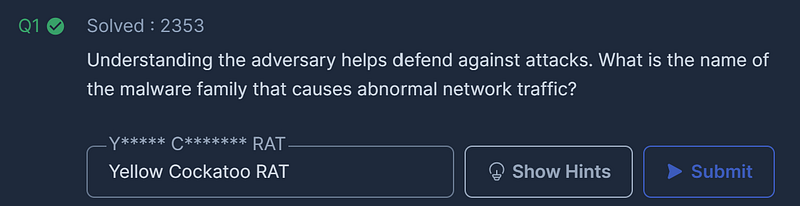
Question 1: Understanding the adversary helps defend against attacks. What is the name of the malware family that causes abnormal network traffic?
Time to kick off this investigation! Our first task is to unzip the challenge file containing a text file, hash.txt. The content of this file is the SHA256 file hash of the malware that infected the employee workstations.
To begin, copy the file hash:
30E527E45F50D2BA82865C5679A6FA998EE0A1755361AB01673950810D071C85
Throughout this challenge we’ll leverage several threat intelligence sources but the first one we’ll use is Hybrid Analysis, an online malware analysis service, to check the unique malware file hash contained in hash.txt. This allows us to check previous reports about the sample and gather more information about the incident. To do this follow the steps below:
- Use your web browser to navigate to https://www.hybrid-analysis.com/
- Select the " # "
Report Search" tab. 3. Paste the file hash into the search box & press " # "
search."
- Select the first report in the list with the timestamp of June 20th, 2022 (though any should work.)
- Within the report, under Falcon Sandbox Reports, click the report from the Windows 7 32 bit sandbox with the threat score of 94/100.
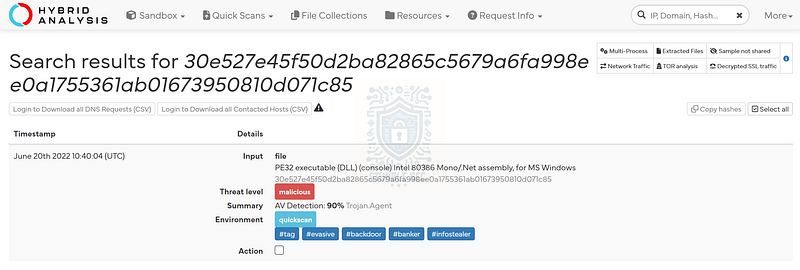
Hybrid Analysis search result: https://www.hybrid-analysis.com/search?query=30E527E45F50D2BA82865C5679A6FA998EE0A1755361AB01673950810D071C85
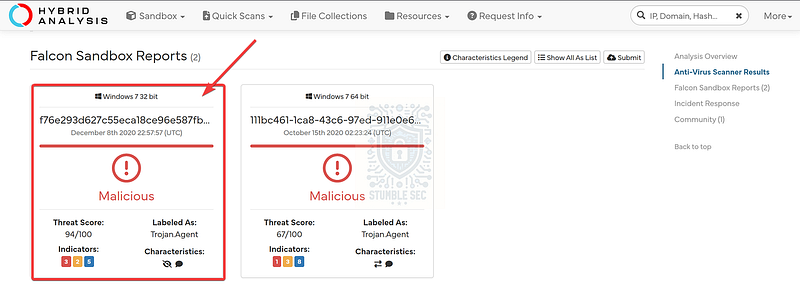
Hybrid Analysis: Selecting the Falcon Sandbox Report
Now that we’re in the report, we can start collecting some intelligence about the malware. The first objective to answer Question 1 is to discover the name of the malware family. To discover this information, we’ll use the Open Source Intelligence (OSINT) section under Additional Context and select the report from Red Canary Intelligence to be redirected to their blog entry.
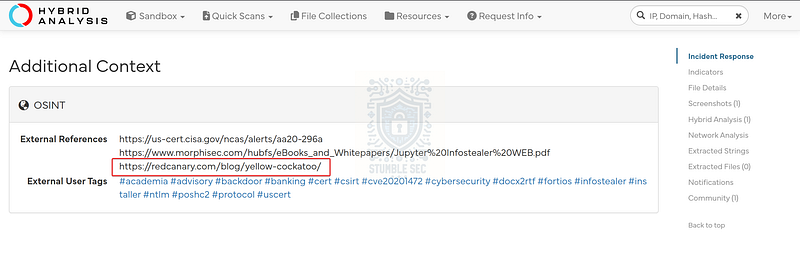
Hybrid Analysis: Selecting the Red Canary Report
We’ll find the malware name is featured prominently as the subject of the write up. Not only that, but we’ll discover some extremely valuable technical information about the malware that can help us to contextualize the attack. Great find! We’ll return to this blog entry later, so keep it handy for later in the investigation.
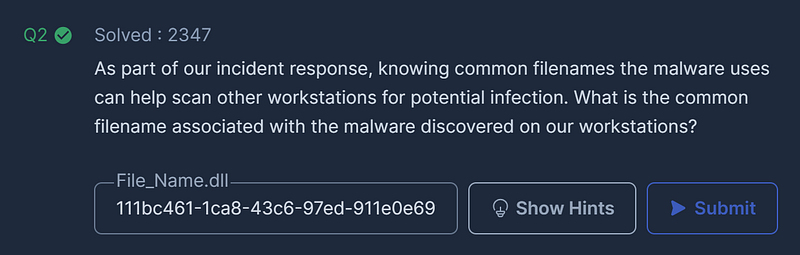
Question 2: As part of our incident response, knowing common filenames the malware uses can help scan other workstations for potential infection. What is the common filename associated with the malware discovered on our workstations?
Now that we’ve uncovered the malware family we’re investigating, let’s pivot to another source of intelligence, VirusTotal. If you’re unfamiliar with it, VirusTotal is another popular malware analysis platform with detailed detection information and analysis reporting for malware samples.
The process of checking VirusTotal is similar to our approach with Hybrid Analysis:
- Use your web browser to navigate to https://virustotal.com
- Paste the file hash into the search box & press " # "
search."
- Once the results page has loaded, select the " # "
Details" tab.
VirusTotal VirusTotalwww.virustotal.com
On the " # "
Details" tab, we’ll see a ton of valuable data about the malware sample but to answer Question 2, we need to discover the common filename used by the malware. We can locate this information by scrolling down to the " # "
Signature info" section under the " # "
File Version Information" header:
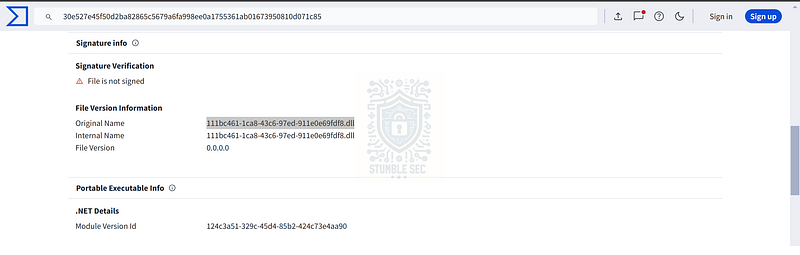
VirusTotal: Identifying the common filename of the sample
Once we’ve identified the " # "
Original Name," copy that value and submit the answer.
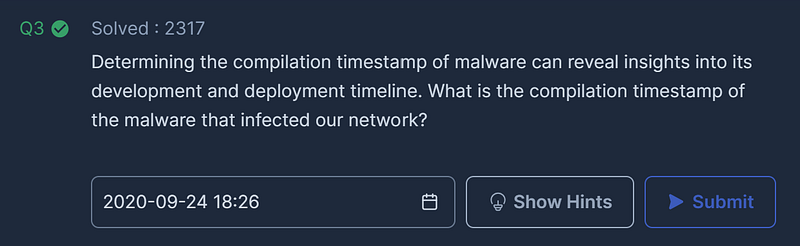
Question 3: Determining the compilation timestamp of malware can reveal insights into its development and deployment timeline. What is the compilation timestamp of the malware that infected our network?
For our next task, we need to determine the timestamp for the malware’s compilation. We can continue to explore the VirusTotal report to locate this information in the " # "
Portable Executable Info" section right below the " # "
Signature Info" we used in the previous question.
Scroll down to the " # "
Header" section to location the Compilation Timestamp value that we’re searching for.
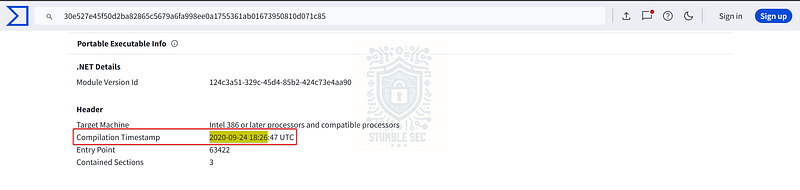
VirusTotal: Identifying the compilation timestamp of the malware sample
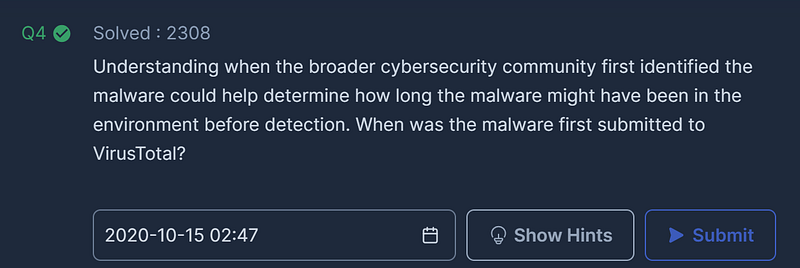
Question 4: Understanding when the broader cybersecurity community first identified the malware could help determine how long the malware might have been in the environment before detection. When was the malware first submitted to VirusTotal?
To answer Question 4, we’ll need to identify the date the malware sample was first submitted to VirusTotal. To locate this information, check the " # "
History" section toward the top of the " # "
Details" tab and check the First Submission timestamp.

VirusTotal: Identifying the first submission time
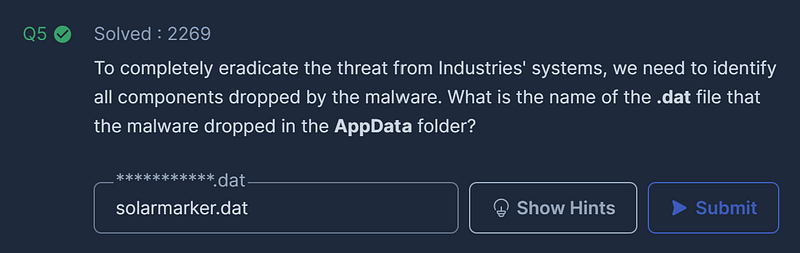
Question 5: To completely eradicate the threat from Industries’ systems, we need to identify all components dropped by the malware. What is the name of the .dat file that the malware dropped in the AppData folder?
Our next objective is to identify files dropped by the malware. Typically, we can locate this information on VirusTotal but in this case, we’ll need to switch gears to find the answer since the data isn’t available on VirusTotal.
Let’s refer back to the Red Canary Intelligence report we discovered in Question 1 and see if we can gather more information from the blog to find the answer.
Scroll down to the " # “Deep dive on the .NET RAT"section of the blog to view the granular technical details of the malware including the name of the .dat file we’re seeking to answer the question.
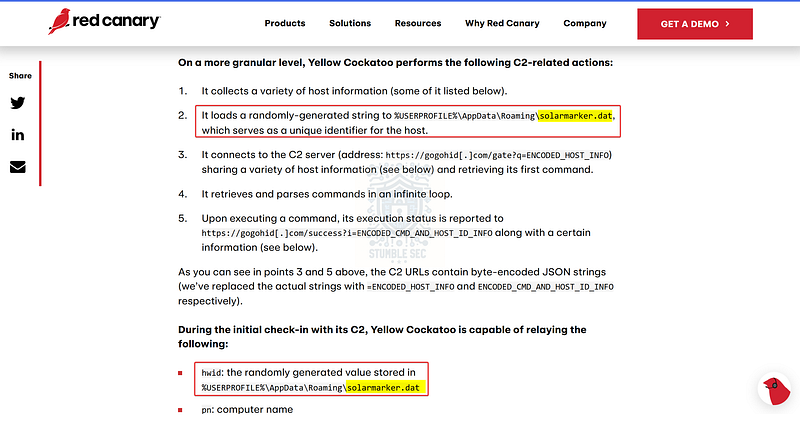
Leveraging the report from Red Canary to identify the .dat file
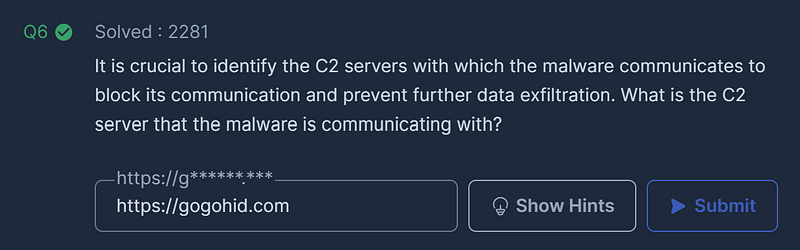
Question 6: It is crucial to identify the C2 servers with which the malware communicates to block its communication and prevent further data exfiltration. What is the C2 server that the malware is communicating with?
We’ve made it to the final question! Our last objective is to identify the command and control (C2) server the malware communicates with. To tie this all together, we’ll check all the previous threat intelligence sources for this information, starting with the Red Canary report.
From the report, in the same section where we located the name of the .dat file for the previous question, we can see that point #3 contains the observed C2 URL used by the sample. That’s a good start, but let’s check another source.
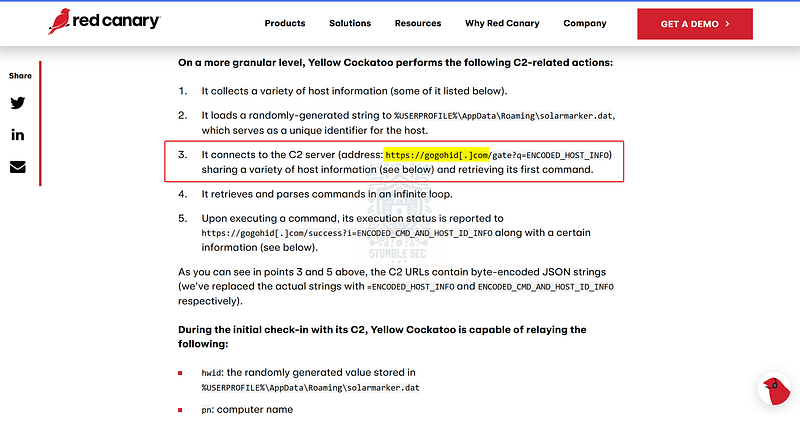
Leveraging the report from Red Canary to identify the C2 server
Referring back to VirusTotal, navigate to the " # "
Behavior” tab and scroll to the " # "
Network Communication" section. Here, we’ll find the same URL that we discovered in the Red Canary report as a " # "
Memory Pattern Domain/URL" indicating a string discovered in the malware sample.
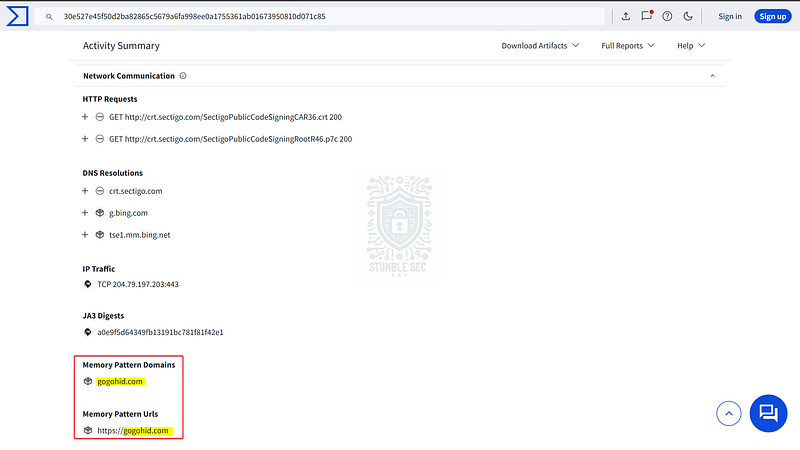
VirusTotal: Identifying the C2 server
We can take this one step further by checking the URL against VirusTotal to determine the reputation of this domain.
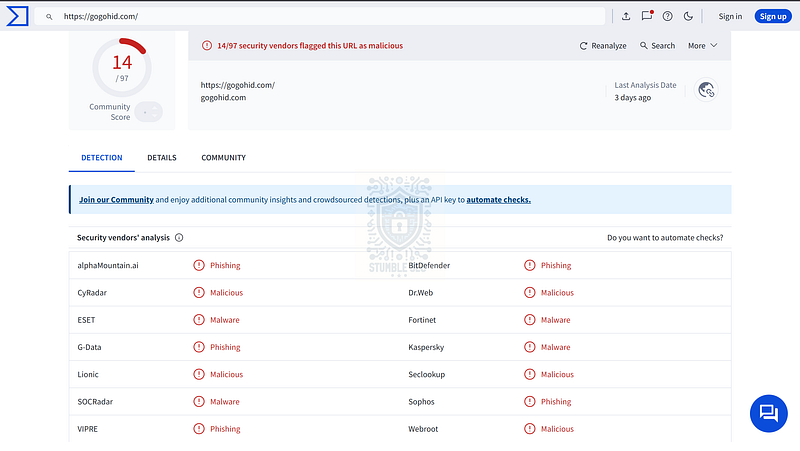
VirusTotal: Detection of C2 URL
Finally, let’s navigate back to the Hybrid Analysis report we used back in Question 1 and locate the " # "
Suspicious Indicators" section and locate the External Systems section. Here we’ll confirm the C2 URL along with the reputation detection of the domain, confirming our findings.
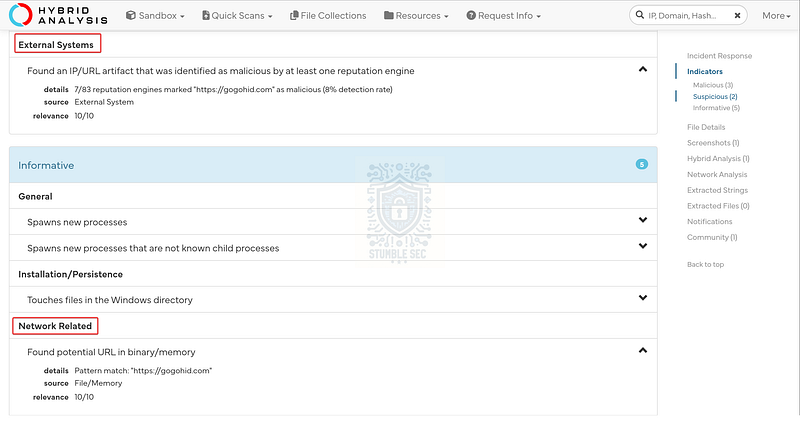
Hybrid Analysis: Locating the C2 URL
With this triple-confirmation, let’s submit the answer and wrap up this investigation!
Conclusion:
There we have it! Starting with the file hash of the sample, we were able to search for detailed information about the malware on VirusTotal and Hybrid Analysis. These platforms provided comprehensive reports on the malware’s behavior, allowing us to understand when it was compiled and seen in the wild, what file it drops, and its C2 infrastructure. The reports also contained links to valuable malware research, like the blog from Red Canary, that we used to tie the investigation together.
Now that we’ve scoped the attack and completed our objectives, let’s close out this walkthrough of the Yellow RAT Lab!
A big thank you to CyberDefenders, for another exciting and realistic lab scenario. I always keep threat intelligence challenges in the rotation. Experience with tools like VirusTotal and Hybrid Analysis is a fundamental in this field. Hands-on practice with these tools and understanding what you can learn from the reports is especially beneficial when time is of the essence during incident response or when defending against a specific threat actor. Although I don’t often have the opportunity to review research done by Red Canary, every time I encounter their work, I’m really impressed with the analysis — I’ll definitely keep them bookmarked!
Thanks for your support and partnering on this investigation. If you found this walkthrough helpful, don’t forget to give it a clap! Your feedback really is invaluable, and it pumps me up to support your security journey. Remember, Cybersecurity is a team sport and we’re in this together!
Until next week’s challenge — stay curious and be safe out there!

Tools & References:
Challenge Link: https://cyberdefenders.org/blueteam-ctf-challenges/yellow-rat/
Hybrid Analysis: https://www.hybrid-analysis.com/
Hybrid Analysis (Sample): https://www.hybrid-analysis.com/sample/30e527e45f50d2ba82865c5679a6fa998ee0a1755361ab01673950810d071c85/5fd004f2f760b679ae373bb3
VirusTotal: https://www.virustotal.com/
VirusTotal (Sample): https://www.virustotal.com/gui/file/30e527e45f50d2ba82865c5679a6fa998ee0a1755361ab01673950810d071c85/community
**Red Canary Threat Intelligence — " # "
Yellow Cockatoo: Search engine redirects, in-memory remote access trojan, and more" :** https://redcanary.com/blog/yellow-cockatoo/