Blue Team Labs Online — The Planet’s Prestige Walkthrough
An Email Header and Content Analysis Challenge Using CyberChef & zipdump.py.
Image Credit: https://blueteamlabs.online/
Introduction:
Welcome to my weekly walkthrough! If you’ve stumbled across this blog searching for a comprehensive guide to The Planet’s Prestige challenge from Blue Team Labs Online, you’re in the right place. This challenge will take us on a thrilling intergalactic rescue mission starting with just a single email. Prepare for blast off!
Challenge Scenario:
CoCanDa, a planet known as ‘The Heaven of the Universe’ has been having a bad year. A series of riots have taken place across the planet due to the frequent abduction of citizens, known as CoCanDians, by a mysterious force. CoCanDa’s Planetary President arranged a war-room with the best brains and military leaders to work on a solution. After the meeting concluded the President was informed his daughter had disappeared. CoCanDa agents spread across multiple planets were working day and night to locate her. Two days later and there’s no update on the situation, no demand for ransom, not even a single clue regarding the whereabouts of the missing people. On the third day a CoCanDa representative, an Army Major on Earth, received an email.
In this challenge, the stakes are high: the daughter of the President of planet CoCanDa has vanished. While agents are scattered across the system searching for her, we’re plugging away in the SOC, keeping systems safe. Suddenly, an Army Major back on Earth receives a suspicious email — could it be a clue? It’s our job to find out.
For this investigation, we’ll be leveraging CyberChef, “The Cyber Swiss Army Knife,” to perform the bulk of our analysis. When we need to dig deeper, we’ll call in reinforcements with Didier Stevens’ zipdump.py utility to aid in the investigation. There are many ways to approach this challenge, and this is just one path, but the goal is to give you a working knowledge of CyberChef you can take back with you to planet Earth. Let’s get to it!
And if you find this walkthrough helpful — whether it levels-up your skills, gets you over a stumbling block, or serves as a handy reference — please give it a clap and consider following me for more content like this.
Thanks for reading and going on this investigation with me!
Setup the Analysis Environment & Extract the Challenge File:
Safety first! When working with lab/challenge files from Blue Team Labs Online (or any educational lab/challenge/range), it’s important to be responsible and stay safe by interacting with potentially malicious files in a dedicated, isolated virtual machine environment. For this challenge I’m using REMnux, a specialized Linux distribution for malware analysis.
To keep this write-up focused, I’m going to skip step-by-step setup directions of REMnux, but if you’d like to set up your own environment, please follow the guide provided by REMnux directly. For reference, I used the virtual appliance method:
[Get the Virtual Appliance | REMnux Documentation _The easiest way to get the REMnux distro is to download the REMnux virtual appliance in the OVA format, import it into…_docs.remnux.org](https://docs.remnux.org/install-distro/get-virtual-appliance?source=post_page--- –d2311959d5f3—
– “https://docs.remnux.org/install-distro/get-virtual-appliance?source=post_page--- –d2311959d5f3—
–”)[](https://docs.remnux.org/install-distro/get-virtual-appliance?source=post_page--- –d2311959d5f3—
–)
Once we have a safe virtual environment created, updated, isolated, and snapshotted, we can extract the challenge file and start the investigation!
Question 1: What is the email service used by the malicious actor?
Let’s kick off our investigation by analyzing the email received by the CoCanDa representative. First, extract the ZIP file containing the artifact — A Hope to CoCanDa.eml.
We have a few methods we can use to open the .eml file, including a mail client or a simple text editor. But for this challenge, we’re going to take a different approach and leverage CyberChef, a multipurpose data manipulation and analysis tool, to perform the full investigation.
If you’re using REMnux like me, CyberChef is already built into the environment, but the web-based version works just as well — your choice! To start, open CyberChef and drag the .eml file into the input window. In the output window, we’ll be able to analyze the email headers.
To answer Question 1, we need to determine the email service that the message originated from. To do this, focus on the “Received” field, which shows all the mail servers the message passed through before delivery — the first one reveals the sender’s mail server as the origin.
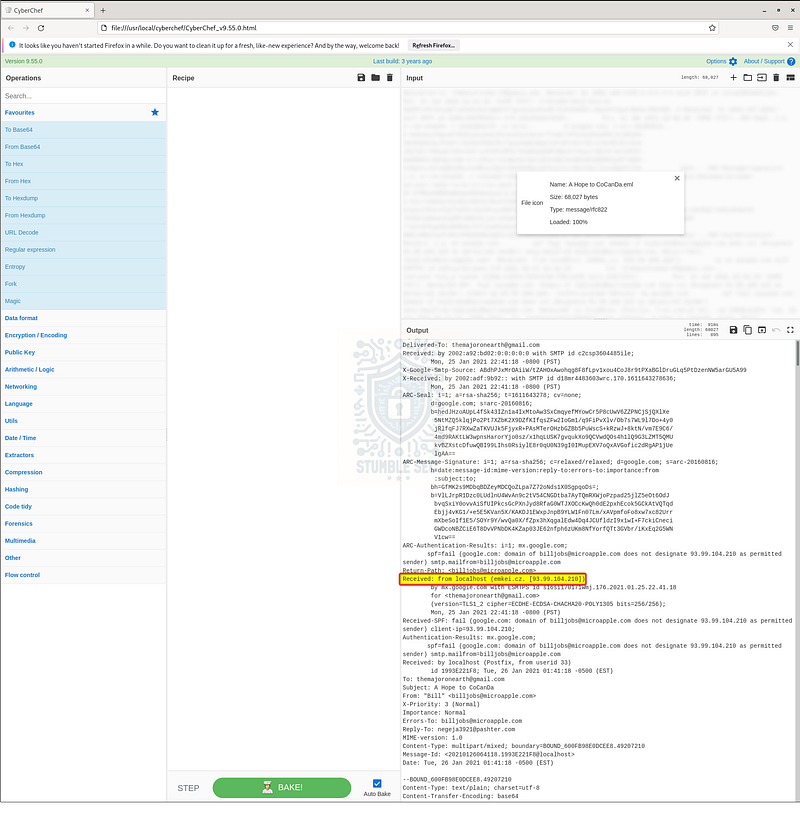
CyberChef: Identifying the originating mail server
This is valuable information to determine the source of the email and help uncover any potential spoofing that may be occurring.

Question 2: What is the Reply-To email address?
To answer Question 2, we need to identify the “Reply-To” address within the email headers. Bad guys can, and often do, spoof the From address.
Sometimes, a mismatch between the From address and Reply-To can be a good indicator that something is amiss. While the “Reply-To” field can also be spoofed, it often reveals the attacker’s real email address, especially in phishing emails where replies are expected.
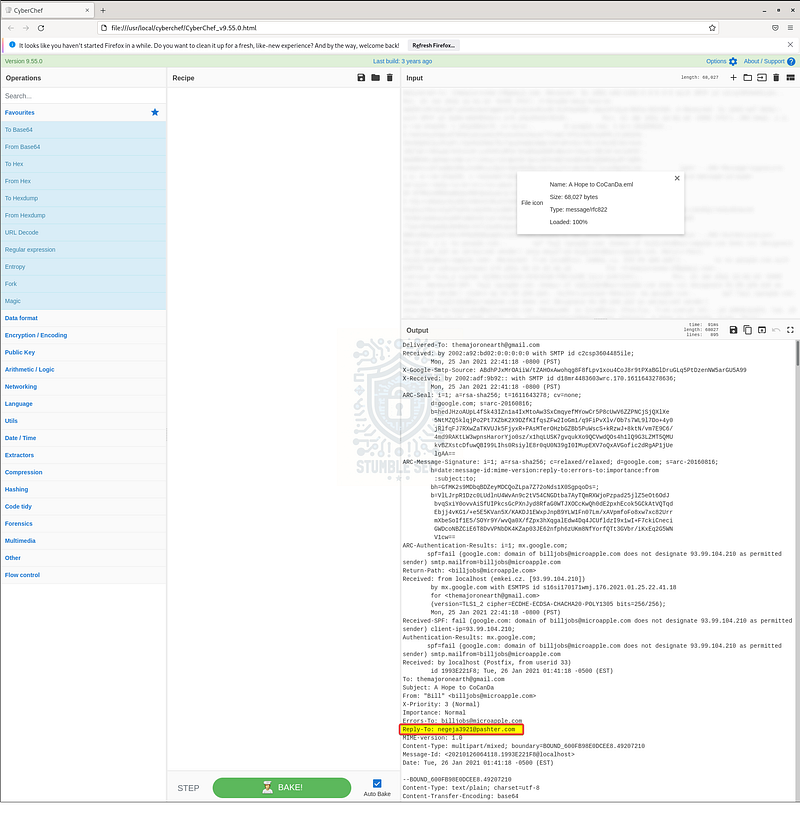
CyberChef: Identifying the Reply-To address
Scroll through the parsed headers and look for the “Reply-To” field. Notice that the email address is different than the From address? This discrepancy might reveal the attacker’s actual inbox.

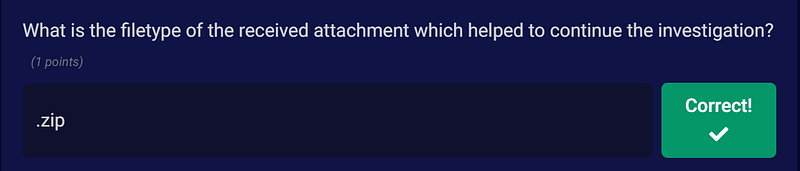
Question 3: What is the filetype of the received attachment which helped to continue the investigation?
Moving right along! To answer Question 3, we need to determine the filetype of the email attachment.
In CyberChef, scroll down past the message headers to the section containing the attachment metadata (part of the MIME headers):
Content-Type: application/pdf; name="PuzzleToCoCanDa.pdf"
Seems pretty straightforward, doesn’t it? But things aren’t always as they seem. While CyberChef displays the declared extension, this information can be spoofed.
To determine the true filetype of the attachment, we need to do a little more legwork. Between the header and the end of the email, there’s a large block of Base64-encoded data — this is the attachment itself.
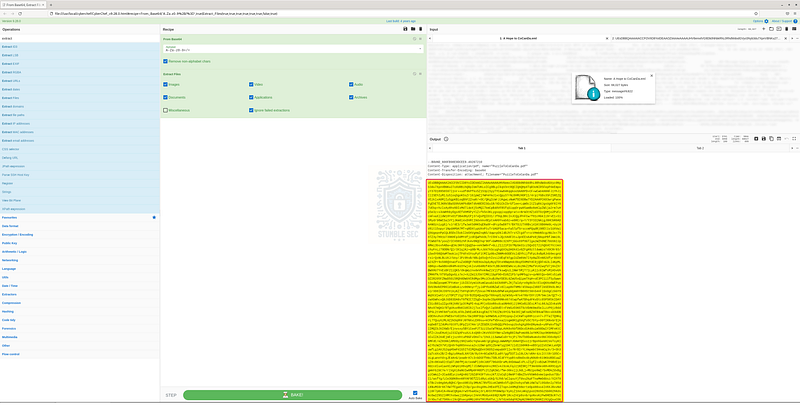
CyberChef: Identifying the attachment as Base64-encoded data
–BOUND_600FB98E0DCEE8.49207210 Content-Type: application/pdf; name=“PuzzleToCoCanDa.pdf” Content-Transfer-Encoding: base64 Content-Disposition: attachment; filename=“PuzzleToCoCanDa.pdf”
[Base64 Encoded Data]
–BOUND_600FB98E0DCEE8.49207210–
To analyze it, copy that Base64-encoded block, then click the + symbol in the top right of CyberChef to add a new input tab. Paste the Base64 data into this new tab.
Now we’re going to build a quick recipe. Since we know the attachment is Base64-encoded, start by adding the “From Base64” operation. Next, add the “Extract Files” operation to leverage CyberChef’s parsing capabilities to identify the embedded files.
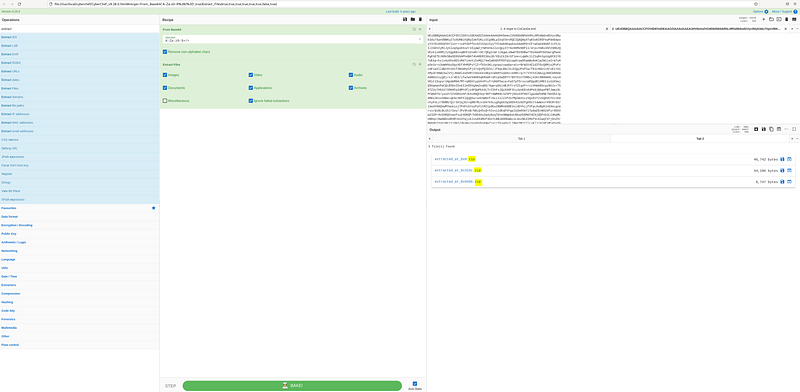
Once we’ve baked our recipe, we can see that the purported .pdf file isn’t a PDF at all, it’s actually a .zip archive!
Question 4: What is the name of the malicious actor?
Now that we’ve identified and extracted the .zip files, let’s go ahead and save them using the Save button in CyberChef next to each extracted file. For our investigation, we’ll focus on the largest file: extracted_at_0x0.zip.
Once it’s saved, extract the contents. Inside, you’ll find:
- Image file (
DaughtersCrown) - Document (
GoodJobMajor) - Spreadsheet (
Money.xlsx)
Our mission in Question 4 is to discover the name of the threat actor. Let’s start by analyzing the GoodJobMajor document in CyberChef. Click Open file as input, then select the document.
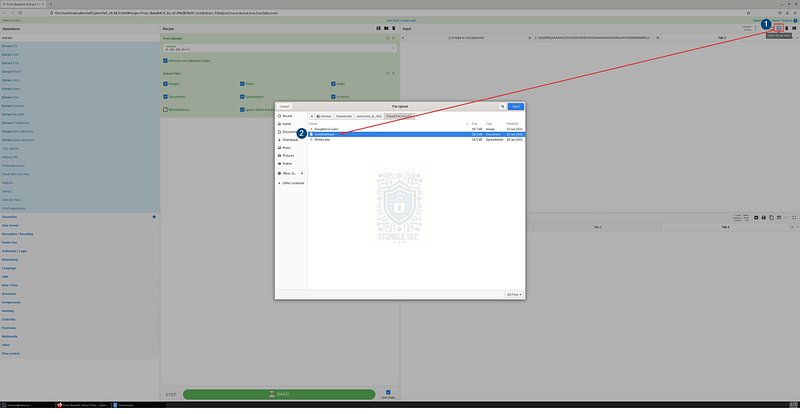
CyberChef: Opening the document as input
We’ll start with a blank slate, so remove all previous operations from the recipe. This time, we’ll only add the “Strings” operation, which extracts readable text from the file which is pretty useful for uncovering embedded metadata.
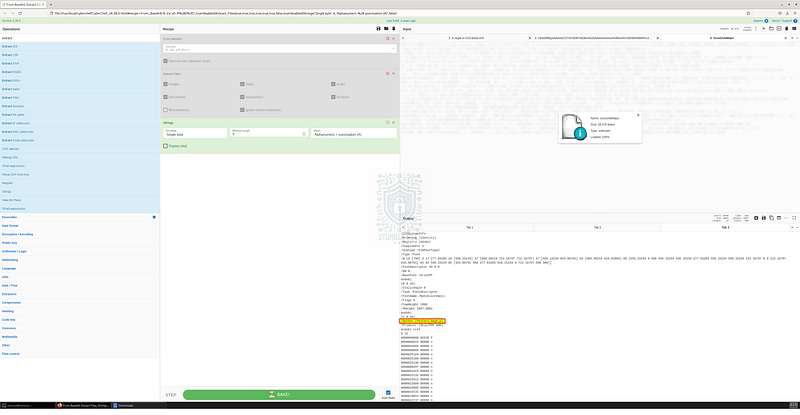
CyberChef: Using the Strings operation to identify the author’s name
By focusing on strings within the metadata, we can identify the author’s name under the /Author stream. In this case, the author field reveals the name of the malicious actor. Let’s submit our answer and move on to the next question!

Question 5: What is the location of the attacker in this Universe?
To answer Question 5, we’ll need to find some clues about the attacker’s physical location within the fictional universe of this challenge.
After analyzing the strings extracted from GoodJobMajor in CyberChef, we didn’t find anything else useful. So, let’s pivot to a second file from the extracted .zip archive: Money.xlsx.
To save you some time, simply using the “Strings” operation in CyberChef won’t help us here. Instead, we’ll bring in another tool: zipdump.py by Didier Stevens. (There are other ways to approach this, so feel free to get creative!)
You might be wondering why we’re using a ZIP analysis tool on an .xlsx file. Great question! File types like .docx, .pptx, and .xlsx are part of the Open Office XML (OOXML) standard, which means they’re actually ZIP archives under the hood.
According to Open Office:
A SpreadsheetML or .xlsx file is a zip file (a package) containing a number of “parts” (typically UTF-8 or UTF-16 encoded) or XML files. The package may also contain other media files such as images. The structure is organized according to the Open Packaging Conventions as outlined in Part 2 of the OOXML standard ECMA-376.
Pretty cool, huh? So, by leveraging zipdump.py, we can dump the contents of the .xlsx file and bring them into CyberChef for further analysis.
Let’s start by checking the available options for zipdump.py using the -h switch.
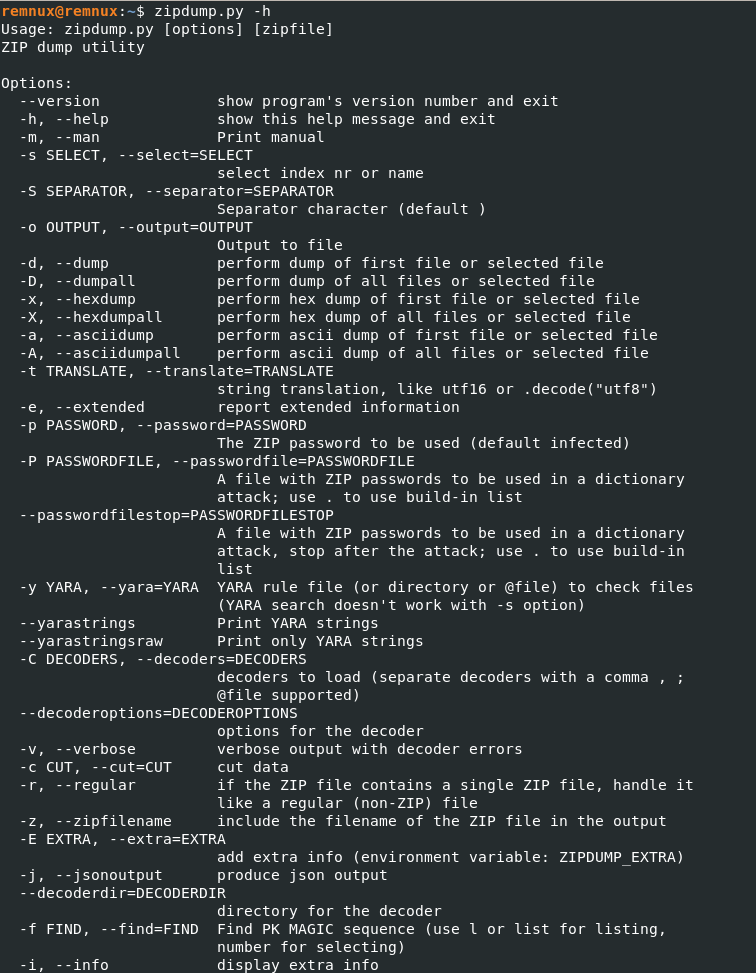
Zipdump.py Options
Then, we’ll try something simple: use the -A option to dump the ASCII contents of all parts of the Money.xlsx archive, specifying your own output directory:
zipdump.py -A Money.xlsx -o
After running the command, zipdump.py dumps the ASCII contents to a text file. Open this file as input with CyberChef and keep the “Strings” operation in the recipe.
As you scroll through the output, you’ll spot what appears to be a plain text message from the attacker. Unfortunately, there’s no clear text indicator of their location.
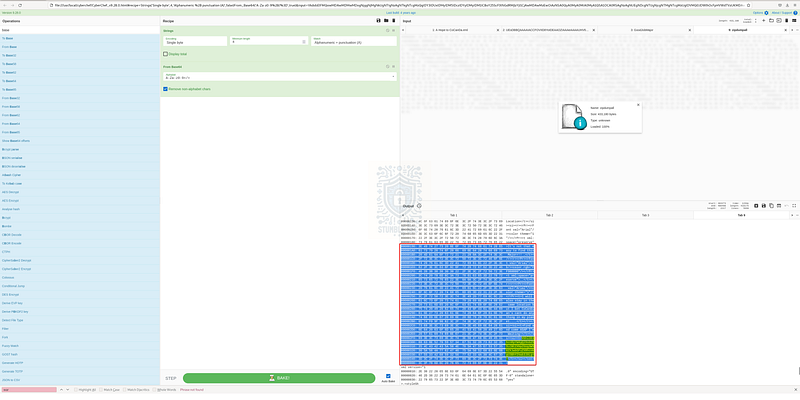
CyberChef: Identifying Base64-encoded string in the zipdump.py output
But take a closer look at the string immediately following the message. Could it be a Base64-encoded location? Let’s find out.
Open a new CyberChef tab and paste the suspicious string. First, remove any padding or extraneous characters so you’re left with just the encoded data. I did this manually by highlighting the extra bits and pressing delete.

CyberChef: Removing extraneous characters
Next, add the “From Base64” operation to the recipe to decode — and voilà — we’ve stumbled onto the attacker’s location! Awesome job!
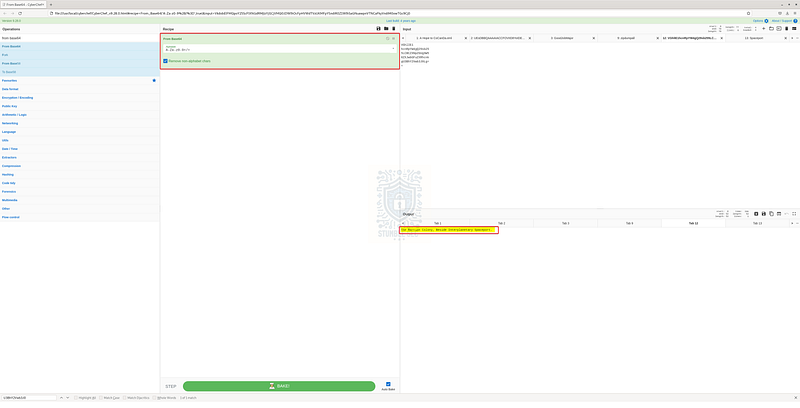
CyberChef: Identifying the attacker’s secret lair

Question 6: What could be the probable C&C domain to control the attacker’s autonomous bots?
By analyzing the attachments, we’ve gained some insight into the attacker’s identity and motives, but we haven’t yet uncovered any indicators of the command and control (C&C) infrastructure — or have we?
Let’s jump all the way back to the email artifact and revisit the header details we uncovered in Question 1 and Question 2.
One important detail is the Reply-To address. As we discussed earlier, this is likely the attacker’s true email address, and the domain could be part of their operational infrastructure. In phishing or malware campaigns, attackers sometimes use the same domain for multiple purposes like hosting phishing pages, malware, or even command and control.
Since this is the only domain we’ve observed that’s directly tied to the attacker, it’s reasonable to assume that it might also serve as a C&C domain, or at least be part of the infrastructure used to manage the “autonomous bots.”
CyberChef: Identifying the Reply-To address / probable C&C domain
In the real world, this would be a solid starting point for collecting threat intelligence and enriching the data with a platform like VirusTotal. For the purposes of this challenge, however, the trail goes cold, so the Reply-To field is our best lead.
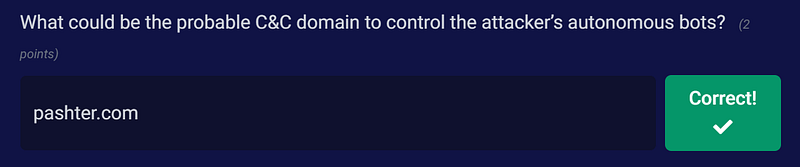
Conclusion:

Give yourself a pat on the back — we’ve earned the gratitude of planet CoCanDa! From a single email sent by the attacker, we’ve leveraged the power of CyberChef to unravel the attacker’s name, location, and supporting infrastructure. Nice job!
Now that we’ve found the location of the President’s daughter, let’s close out this walkthrough of The Planet’s Prestige.
A big thank you to Blue Team Labs Online for another engaging challenge — I really enjoyed the kitschy theme of this one! I chose it for the sci-fi flavor but stayed for the mystery. I was determined to push myself to use CyberChef in ways I hadn’t tried before and see how much of the investigation I could complete using just that one tool. I was genuinely surprised by some of the functionality I hadn’t discovered before. It just goes to show that you can always find new ways to use old tools.
While I eventually had to pivot to a second tool, I wasn’t disappointed. Getting more practice with zipdump.py was a bonus. It’s such a handy utility that I hadn’t used it in a while. This challenge was the perfect excuse to dust it off.
Thanks for your support and partnering on this investigation — I hope you had a blast!. If you found this walkthrough helpful, don’t forget to give it a clap! Your feedback really is invaluable, and it pumps me up to support your security journey. Remember, Cybersecurity is a team sport and we’re in this together!
Until next week’s challenge — stay curious and be safe out there!

Tools & References:
Challenge Link: https://blueteamlabs.online/home/challenge/the-planets-prestige-e5beb8e545
REMnux: https://remnux.org/
CyberChef: https://gchq.github.io/CyberChef/
Mailtrap.io — Email Header Explanations: https://mailtrap.io/blog/email-headers/
Didier Stevens — Zipdump.py: https://blog.didierstevens.com/2020/07/27/update-zipdump-py-version-0-0-20/
DidierStevensSuite — GitHub: https://github.com/DidierStevens/DidierStevensSuite
Open Office XML — SpreadsheetML: http://officeopenxml.com/anatomyofOOXML-xlsx.php