Blue Team Labs Online — Malicious PowerShell Analysis Walkthrough
An incident response challenge using CyberChef and URLhaus.
Image Credit: https://blueteamlabs.online/
Introduction:
Welcome to my weekly walkthrough! If you’ve stumbled across this blog searching for a comprehensive walkthrough of the Malicious PowerShell Analysis challenge from Blue Team Labs Online, you’re in the right place.
In this scenario, an employee opened a phishing email and executed malware on their system, causing a business-wide disruption. As part of the incident response team, we’re provided an encoded PowerShell script and our mission is to analyze the contents of this script and identify the malware it contains.
To perform our investigation, we’ll hop into the kitchen with CyberChef, a popular tool to perform data decoding and analysis, to examine the PowerShell script. Throughout the investigation, we’ll map the adversary’s techniques and software to MITRE ATT&CK, a global knowledge base of adversary tactics and techniques, to gain a comprehensive understanding of the attack. Finally, we’ll leverage an external cyber threat intelligence service to uncover more details about the malware. Sounds like a good time to me — let’s get into it!
If you find this walkthrough helpful — whether it levels-up your skills, gets you over a stumbling block, or serves as a handy reference — please give it a clap and consider following me for more content like this.
Thanks for reading and going on this investigation with me!
Challenge Scenario:
Recently the networks of a large company named GothamLegend were compromised after an employee opened a phishing email containing malware. The damage caused was critical and resulted in business-wide disruption. GothamLegend had to reach out to a third-party incident response team to assist with the investigation. You are a member of the IR team — all you have is an encoded Powershell script. Can you decode it and identify what malware is responsible for this attack?
Setup the REMnux Analysis Environment & Extract the challenge file:
Safety first! When working with lab/challenge files from Blue Team Labs Online (or any educational lab/challenge/range), it’s important to be responsible and stay safe by interacting with potentially malicious files in a dedicated, isolated virtual machine environment. For this challenge I’m using REMnux, a specialized Linux distribution for malware analysis.
To keep this write-up focused, I’m going to skip step-by-step setup directions of REMnux, but if you’d like to set up your own environment, please follow the guide provided by REMnux directly. For reference, I used the virtual appliance method:
[Get the Virtual Appliance | REMnux Documentation _The easiest way to get the REMnux distro is to download the REMnux virtual appliance in the OVA format, import it into…_docs.remnux.org](https://docs.remnux.org/install-distro/get-virtual-appliance?source=post_page--- –d2311959d5f3—
– “https://docs.remnux.org/install-distro/get-virtual-appliance?source=post_page--- –d2311959d5f3—
–”)[](https://docs.remnux.org/install-distro/get-virtual-appliance?source=post_page--- –d2311959d5f3—
–)
Once you have a safe virtual environment created, updated, isolated, and snapshotted, we can extract the challenge file and start the investigation!
Question 1: What security protocol is being used for the communication with a malicious domain?
Let’s dive right in and extract the challenge file where we’ll find our sample, ps_script.txt. We can open this file with any text editor, but for this walkthrough, I’ll be using Notepad++.
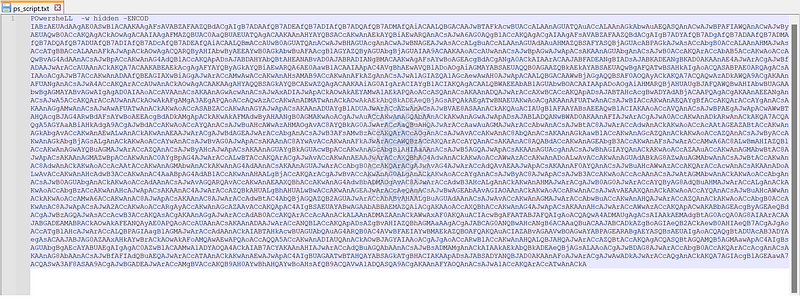
Encoded PowerShell Command
Inside the file, the contents contain a block of Base64 encoded code indicated by the -ENCOD argument, which allows encoded commands to be passed and executed. This is a common defense evasion (MITRE ATT&CK T10027.010) method used by attackers to obfuscate their code.
Our first task is to decode this script to determine the goals of the attacker. We can accomplish this by leveraging CyberChef to help us deobfuscate the script using the following steps:
- Open CyberChef — this is built into REMnux, but the web-based version works too.
- Paste the encoded command into CyberChef’s “Input” window.
- Apply the “From Base64” operation to the recipe.
- Add the “Remove null bytes” operation.
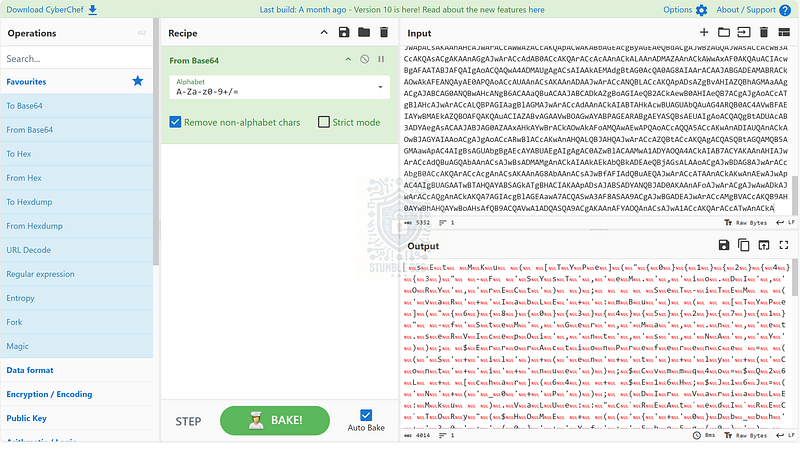
Applying the From Base64 Operation
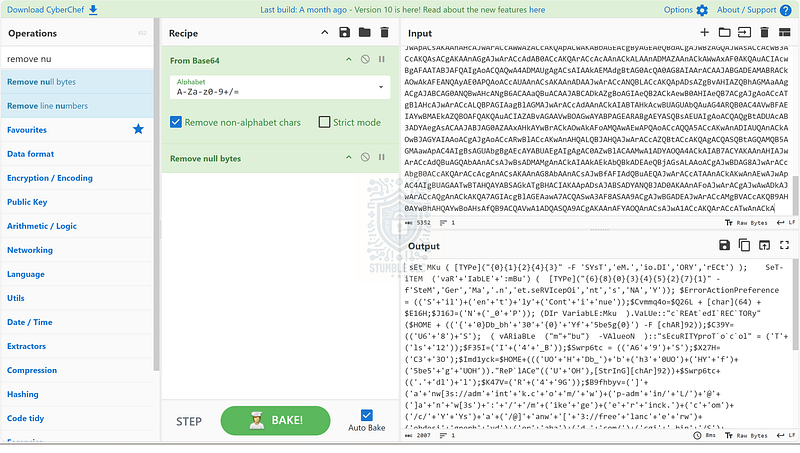
Applying the Remove Null Bytes Operation
We’re getting closer and we can identify some readable strings, but there is still some additional obfuscation to deal with. Going through the first couple of lines, we can identify several junk characters separating clear text words within the script.
To remove these characters:
- Add the “Find/Replace” operation to the recipe.
- Enter the regex
[,'()+\"]to define the individual characters within the brackets we want to match. Feel free to add others if you spot them. - Leave the “Replace” field empty to replace the characters defined in the regex with blank characters.
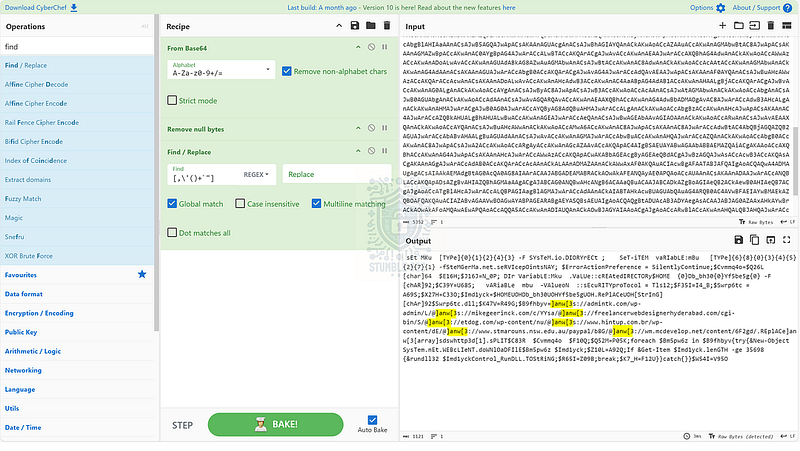
We’re getting even closer to making the script human-readable but notice that the URL strings begin with ]anw[3 instead of something more familiar like http. Let’s add another “Find/Replace” operation, this time using the “Simple String” matching and replacing ]anw[3 with http to read the URLs more clearly.
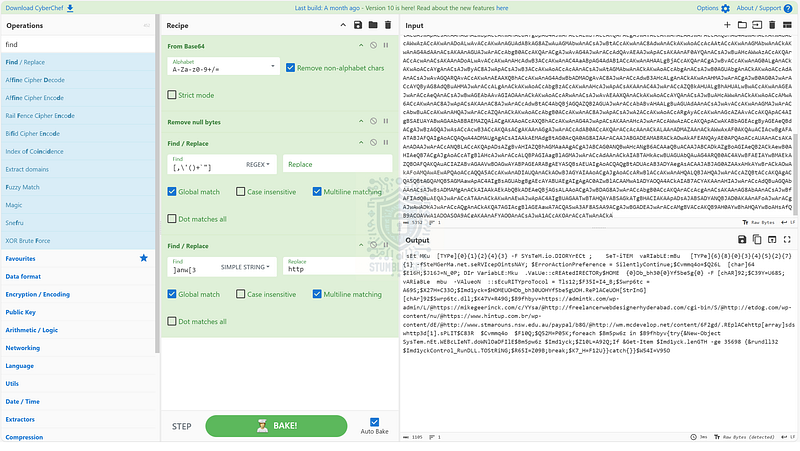
Applying a second Find/Replace Operation
After this change, the script is much more readable, but let’s take this one step further and split the script into individual lines. We can accomplish this by adding one final operation to the recipe — “Split.” Once added to the recipe, set the split delimiter on the ; character to separate the commands into individual lines.
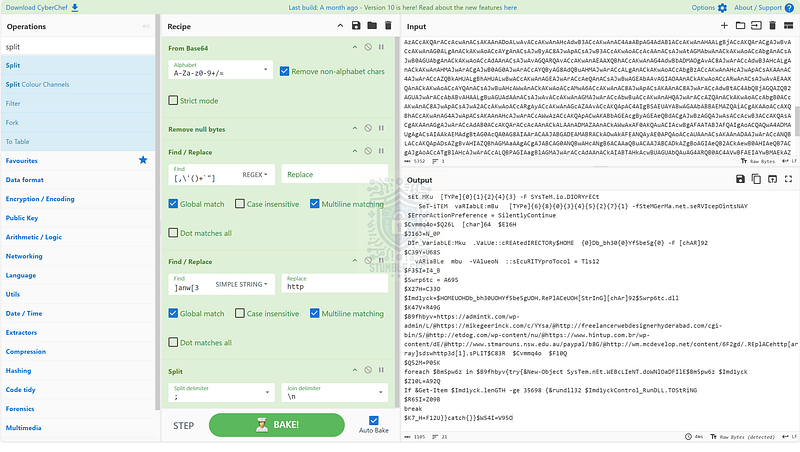
Applying the Split Operation
Finally, we have a much more readable version of the script which we can use to perform our analysis.
To answer Question 1, we need to identify the “security protocol” being used for communication with the malicious domain. We can locate this information in the script by finding the line referencing “security protocol,” where it shows a value of TLS12 or Transport Layer Security version 1.2.
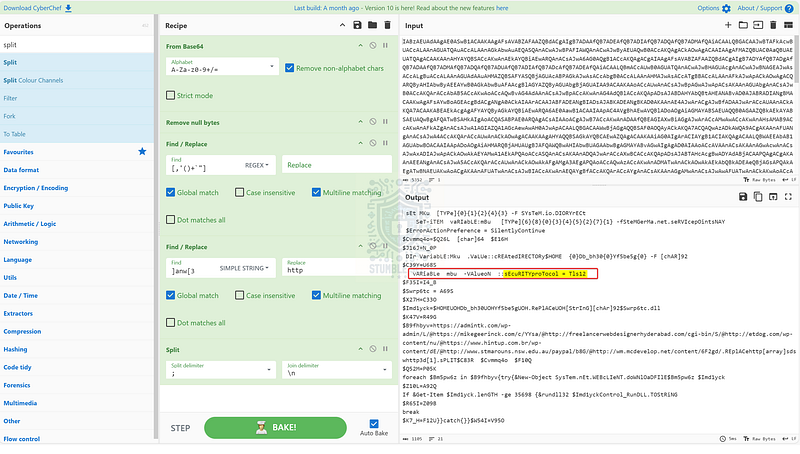
Identifying the Security Protocol in the script

Question 2: What directory does the obfuscated PowerShell create? (Starting from \HOME)
Next, we’ll need to identify what directory the script creates. Since this is an obfuscated script, it’s not as straightforward as answering Question 1.
To find the first clue, let’s read through the script contents until we stumble across the highlighted variable cREAtedIRECTORy$HOME. This seems like a good place to start searching since there is a reference to the CreateDirectory method, and there are some obfuscated characters next to this string which might contain the file path.
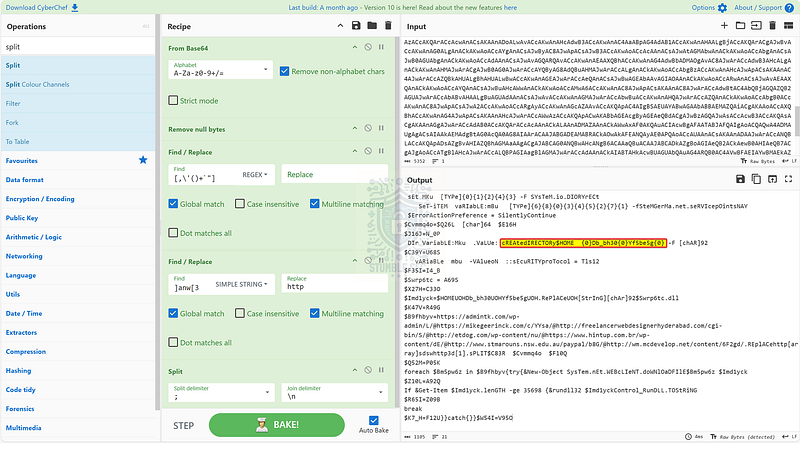
Identifying the CreateDirectory method.
Let’s scroll further down for more clues where we’ll find a second reference to $HOME. The trick is that the string doesn’t look how we would expect a directory path to appear, so we’ll need to apply another operation to our CyberChef recipe to decode the correct file path structure.
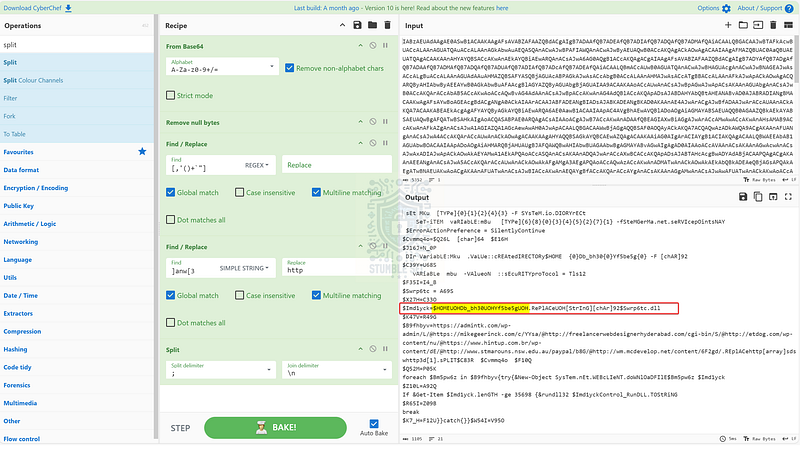
Identifying the directory variable
If we look at the end of the variable, we can see the string UOH. Highlighting this reveals several instances in the same line. What if we replace this string with \ instead? Apply another “Find / Replace” to see the results.
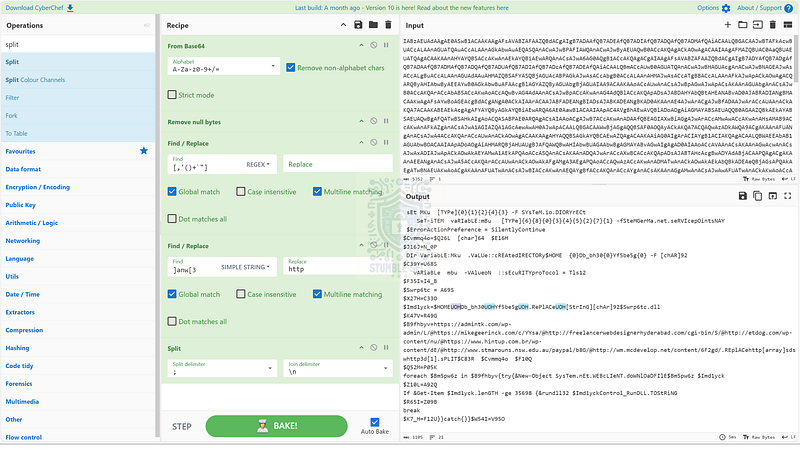
Identifying the string to replace
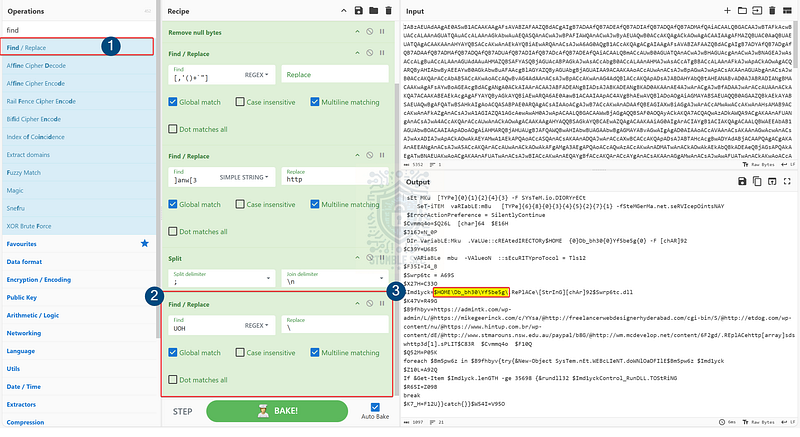
Applying a second Find/Replace operation
Once we perform this replacement, we can see a clear file path declared by the variable. Let’s check our work and move on to the next question.

Question 3: What file is being downloaded (full name)?
Now that we’ve uncovered the directory the script creates, we’ll need to identify the name of the file it downloads. To locate this information, let’s search for clues in the script that point toward download activity. We can find this toward the bottom of the script in the [SysTem.nEt.WEBcLIeNT.doWNlOaDFIle](https://learn.microsoft.com/en-us/dotnet/api/system.net.webclient?view=net-9.0) method, which is used to download data from a URI resource to a file — in this case, the URIs we decoded earlier.
At the end of the line, notice the reference to the variable $Imd1yck. This is the same variable that contains the directory we identified in the previous question.
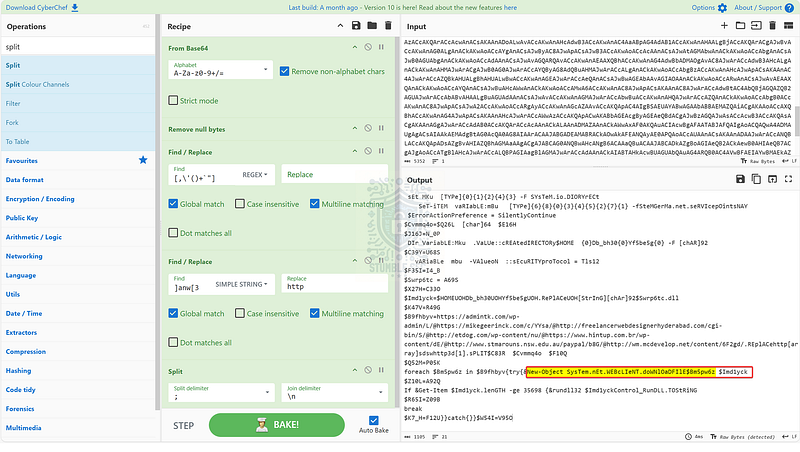
Identifying DownloadFile activity in the script
Going back to the previous question, at the end of the line, we will see the file extension .dll appended to a variable, indicating the downloaded file. Highlighting the file name variable, we are shown another location in the script where the variable is declared, and we can see the data it contains — this is the file name we are searching for to answer Question 3.
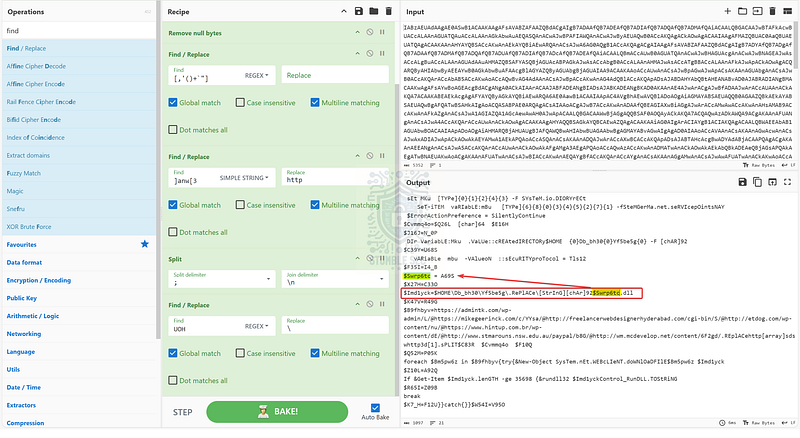
Identifying the name of the downloaded file

Question 4: What is used to execute the downloaded file?
To determine how the A69S.dll file is executed, we need to look for another method in the script that executes this file. To find it, highlight the variable name $Imd1yck, which indicates the file path. Performing this action highlights all instances in the CyberChef output.
Let’s look more closely at the last hit where we can see rundll32 being used to execute the downloaded file (T1218.001).
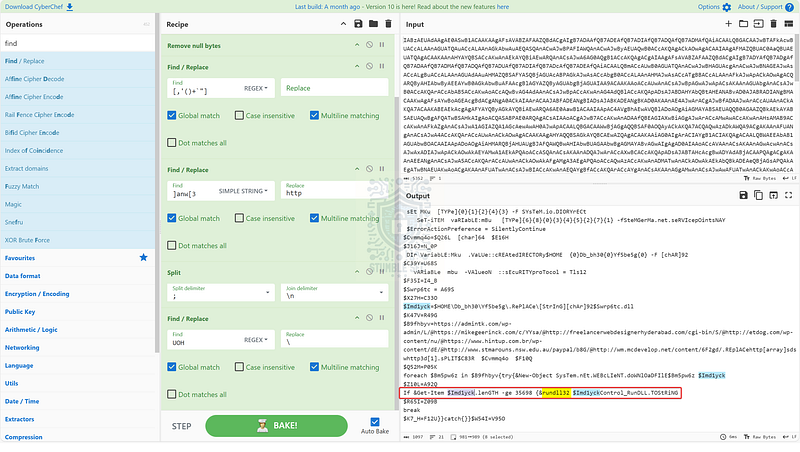
Identifying rundll32

Question 5: What is the domain name of the URI ending in ‘/6F2gd/’
To answer Question 5, we’ll need to locate the domain name of a specific URI. Since we have already done the legwork and deobfuscated the URLs, we can leverage the “Find” function within CyberChef:
- Click anywhere inside of the “Output” window.
- Press
Ctrl+Fto bring up the search box. - Enter
/6F2gd/in the search box to identify the domain.
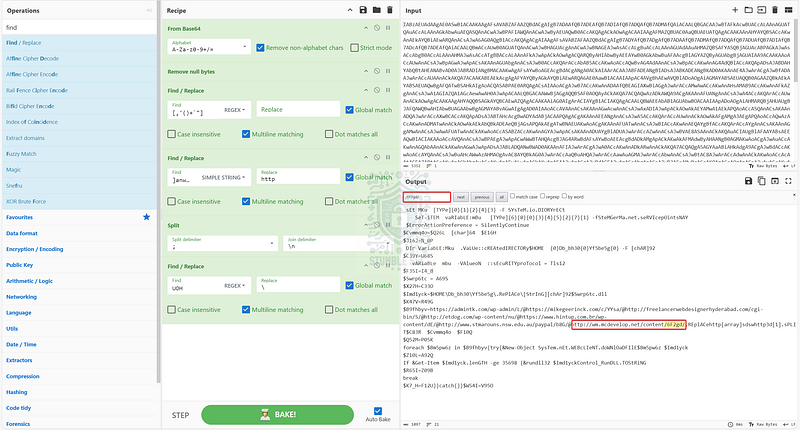
Identifying the domain name for the specified URI

Question 6: Based on the analysis of the obfuscated code, what is the name of the malware?
We’ve made it to the last question. Our final task is to correlate all the evidence we’ve discovered in the script to figure out the name of the malware. To do this, let’s start with the domain we discovered in the last question and pivot to some external threat intelligence services for further investigation.
We’ll start with URLhaus, a platform offered by cyber threat intelligence provider abuse.ch that is “dedicated to sharing malicious URLs that are being used for malware distribution,” and search the database for the domain name we found in Question 5.
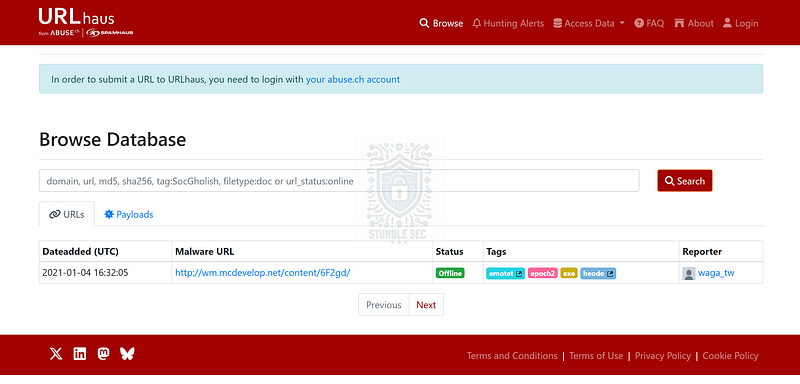
https://urlhaus.abuse.ch/browse.php?search=wm.mcdevelop.net
Following our search, we have a hit! We can see in the “tags” area that this domain is associated with the Emotet malware family.
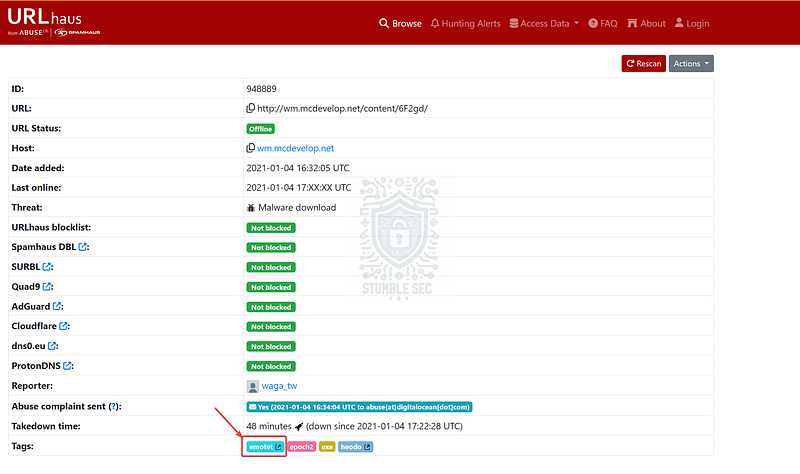
https://urlhaus.abuse.ch/url/948889/
This is enough data to determine the malware family name we are searching for to complete the challenge. Now let’s wrap up this investigation!

Conclusion:
There we have it — mission accomplished! Using CyberChef, we decoded and deobfuscated the malicious PowerShell script. By analyzing its contents, we determined the methods the script uses, URL it contacts, and the files the script downloads as a second stage. Then, using URLhaus, we pieced together the evidence to identify the malware as Emotet. Throughout the investigation, we referenced MITRE ATT&CK and Microsoft Learn to better understand how the script operates, giving us a comprehensive view of the attack.
Now that we’ve scoped the attack and completed our objectives, let’s close out this walkthrough of the Malicious PowerShell Analysis challenge!
A big thank you to Blue Team Labs Online for another engaging and challenging lab scenario. I chose this challenge to practice with CyberChef and keep my skills up to date. While I don’t often manually analyze scripts in my day job, it’s an essential skill to have in your toolkit to build confidence during incident response engagements, especially if you don’t have access to more advanced tools that can assist in your analysis. Awesome stuff!
Thanks for your support and partnering on this investigation. If you found this walkthrough helpful, don’t forget to give it a clap! Your feedback really is invaluable and it pumps me up to support your security journey. Cybersecurity is a team sport and we’re in this together!
Until next week’s challenge — stay curious and be safe out there!
Tools & References:
REMnux: https://remnux.org/
Challenge Link: https://blueteamlabs.online/home/challenge/malicious-powershell-analysis-bf6b52faef
Notepad++: https://notepad-plus-plus.org/
MITRE ATT&CK — Obfuscated Files or Information: Command Obfuscation ( T1027.010): https://attack.mitre.org/techniques/T1027/010/
CyberChef: https://gchq.github.io/CyberChef/
Microsoft Learn — WebClient Class: WebClient Class (System.Net) | Microsoft Learn
MITRE ATT&CK — System Binary Proxy Execution: Rundll32 ( T1218.011): System Binary Proxy Execution: Rundll32, Sub-technique T1218.011 — Enterprise | MITRE ATT&CK®
URLhaus: https://urlhaus.abuse.ch/browse.php?search=wm.mcdevelop.net
MITRE ATT&CK — Software: Emotet ( S0367): https://attack.mitre.org/software/S0367/